Sign up with Google
 Sign in with Zoho

A website can look polished, contain useful content, and attract visitors while still delivering a frustrating user experience. Pages may take too long to display their main content, buttons may respond slowly, or elements may shift unexpectedly while someone is trying to read or click.
These problems can affect user satisfaction and make it harder for visitors to complete important actions, such as requesting a quote, purchasing a product, or submitting a contact form.
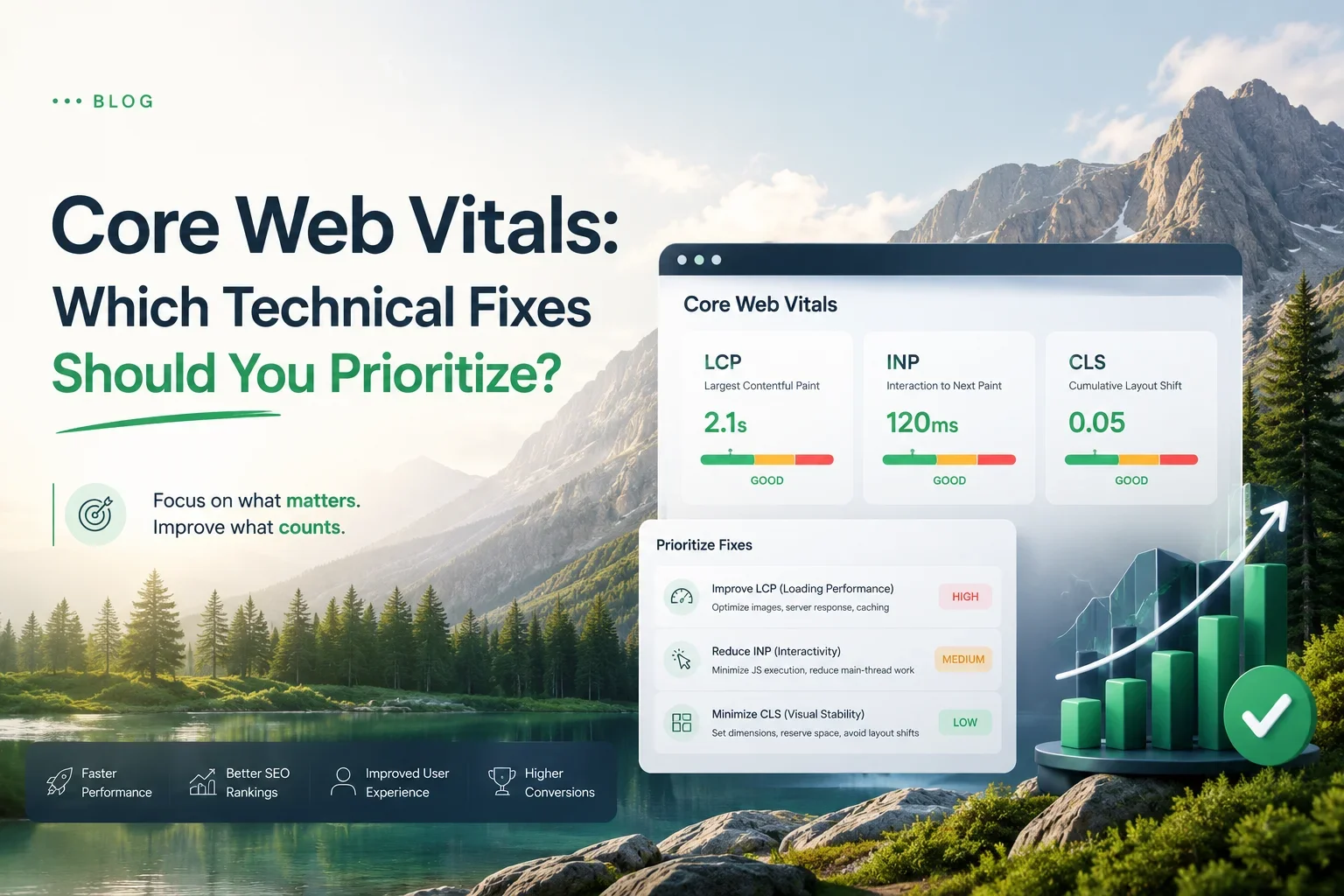
Core Web Vitals provide a way to measure three important aspects of page experience: loading performance, responsiveness, and visual stability.
However, improving them is not simply a matter of installing a speed plugin or chasing a perfect PageSpeed Insights score. Different problems require different solutions, and the most valuable fix depends on what is actually slowing down or destabilizing your pages.
This guide explains what Core Web Vitals measure, how to diagnose common problems, and how to prioritize technical fixes according to their likely impact.
For a broader overview of technical SEO, crawling, indexing, and website health, see the Technical SEO Encyclopedia 2026.
What Are Core Web Vitals?
Core Web Vitals are Google's metrics for evaluating key aspects of the user experience on a webpage.
The current Core Web Vitals consist of three metrics:
These thresholds are assessed at the 75th percentile of page visits, with mobile and desktop experiences evaluated separately where data is available.
In practical terms, a page should display its main content quickly, respond promptly when visitors interact with it, and avoid unexpected layout shifts.
Core Web Vitals are important performance signals, but they are not a complete measure of website quality. A fast page with weak content may still struggle in search results, while a useful page may have opportunities to improve its experience without requiring a complete technical rebuild.
The objective is to improve real user experience while maintaining the content, functionality, and accessibility that make the page useful.
Why You Should Not Optimize Every Performance Metric at Once
One of the most common performance mistakes is treating every warning as equally important.
A performance audit may report oversized images, unused JavaScript, render-blocking resources, long main-thread tasks, layout shifts, and other opportunities. Trying to fix everything simultaneously can waste development time and introduce unnecessary risk.
Instead, prioritize issues using four questions:
- How many important pages are affected? A problem shared by every service page may deserve more attention than one affecting a rarely visited URL.
- How severe is the user impact? A page that takes several seconds to display its main content may deserve priority over a minor optimization opportunity.
- Does the issue affect real users? Field data can help distinguish persistent problems from unusual laboratory test results.
- How difficult and risky is the fix? A simple image optimization may be preferable to a major framework change when both offer a reasonable improvement.
This approach helps you focus on the bottlenecks that matter rather than spending hours improving metrics that have little practical impact.
1. Improve Largest Contentful Paint First When Loading Is the Main Problem
Largest Contentful Paint measures how long it takes for the largest relevant image or text block in the visible viewport to appear.
A poor LCP score can make a page feel slow even if other parts of the website respond normally.
Common causes include slow server responses, delayed loading of the main image, render-blocking CSS or JavaScript, and unnecessary resource dependencies.
How to diagnose LCP problems
Start with Google PageSpeed Insights and inspect the LCP result for an important page.
Where available, review the LCP element and the diagnostic information identifying which resource or processing stage contributes to the delay.
For example, a service page may use a large hero image as its LCP element. If that image is oversized or discovered late by the browser, the page's LCP may suffer.
Another page may have a slow server response that delays the delivery of the entire HTML document.
These problems require different fixes, so identify the cause before making changes.
Technical fixes for LCP
Optimize the main image. Use appropriately sized images and efficient formats such as WebP or AVIF when suitable. Avoid sending a very large image to a small mobile viewport.
Make important resources discoverable early. Ensure the browser can discover the main content image through the initial HTML when practical. Consider preloading a critical image only when testing confirms that it helps.
Improve server response time. Review hosting performance, caching, database queries, and application processing when the initial response is slow.
Reduce render-blocking resources. Review CSS and JavaScript that delay the first meaningful rendering of the page. Remove unnecessary dependencies and load noncritical resources in ways that do not delay important content.
Avoid lazy-loading the LCP image. If the main visible image is the LCP element, lazy-loading it can delay its appearance. Reserve lazy-loading primarily for images that are not initially visible.
The best LCP fix is the one that addresses the actual delay. Compressing images will not solve a server bottleneck, and upgrading hosting will not automatically fix an image that loads too late.
2. Improve Interaction to Next Paint When Pages Feel Unresponsive
Interaction to Next Paint measures how quickly a page responds visually after a user interaction, such as clicking a button, tapping a menu, or entering information into a form.
A page can load quickly but still feel sluggish if its JavaScript keeps the browser busy.
For example, a visitor might click a navigation menu and experience a noticeable delay before the menu opens. A form may also become unresponsive while a large script processes other tasks.
How to diagnose INP problems
Use PageSpeed Insights and available real user data to investigate responsiveness.
Look for long JavaScript tasks, excessive event-handler work, large scripts, and expensive updates to the page's layout or visual content.
Browser developer tools can help you inspect performance recordings and identify tasks that occupy the main thread for too long.
Technical fixes for INP
Reduce unnecessary JavaScript. Remove scripts and libraries that do not provide meaningful functionality. Avoid loading every feature on every page when it is not required.
Break up long tasks. Large operations can prevent the browser from responding promptly to user interactions. Splitting work into smaller tasks can allow the browser to process user input more effectively.
Optimize event handlers. Keep interaction handlers efficient. Move expensive processing away from the immediate interaction path where practical.
Reduce unnecessary DOM updates. Excessive changes to page elements can trigger expensive style calculations, layout work, and rendering.
Review third-party scripts. Analytics tools, chat widgets, advertising scripts, and other external integrations can contribute to main-thread activity. Remove unnecessary integrations and assess whether essential ones can be loaded more efficiently.
Avoid excessive client-side hydration. Frameworks that convert server-rendered content into interactive components can introduce substantial JavaScript work. Consider whether every component needs to be interactive immediately.
INP optimization often requires more than a single code change. Start with the slow interactions and scripts that have the greatest effect on actual visitors.
3. Fix Cumulative Layout Shift When Elements Move Unexpectedly
Cumulative Layout Shift measures unexpected movement of visible page elements during the page's lifetime.
Imagine a visitor trying to click a button, only for an advertisement to load above it and push the button downward. The visitor may accidentally click a different element.
Unexpected shifts can make a website feel unstable and reduce confidence in its interface.
Common causes of CLS
- Images without reserved dimensions.
- Advertisements or embeds inserted after the page has loaded.
- Web fonts that cause text to reflow.
- Banners that push existing content downward.
- Dynamically injected elements that change the layout.
- Content that appears above existing content without sufficient reserved space.
Technical fixes for CLS
Specify image dimensions. Include width and height attributes or otherwise reserve the correct aspect ratio so the browser can allocate space before the image loads.
Reserve space for advertisements and embeds. If an element loads asynchronously, define an appropriate container size where possible.
Avoid inserting content above existing content unexpectedly. Place new banners or notifications in a way that does not disrupt the current layout, unless a user interaction makes the movement expected.
Optimize font loading. Use suitable font-display settings and choose fallback fonts that minimize layout differences.
Keep animations from changing layout. Where possible, animate properties such as transform and opacity rather than properties that trigger repeated layout recalculation.
CLS is often one of the more straightforward Core Web Vitals metrics to improve because the causes are visible once the page is examined carefully. However, the right fix still depends on which element is responsible for the shift.
Which Core Web Vitals Fix Should You Prioritize?
The following framework can help you decide where to begin.
This table provides starting points, not guaranteed diagnoses. Confirm the underlying cause before committing to a fix.
How to Audit Core Web Vitals Step by Step
Step 1: Select Important Pages
Start with the URLs that contribute most to your business goals.
For a service business, these may include the homepage, service pages, contact page, and high-traffic articles. An ecommerce website may prioritize product pages, category pages, and checkout-related experiences.
Include representative page templates rather than testing only the homepage.
Step 2: Review Field Data
Open Google PageSpeed Insights and inspect available real user data.
Field data reflects actual visits over a longer collection period and can help reveal issues that affect users across different devices and network conditions.
Not every URL has enough data to receive an individual field assessment. PageSpeed Insights may show aggregated data for a group of similar pages or no field data at all.
Do not assume that missing field data means a page is fast or slow.
Step 3: Run Laboratory Tests
Review the lab results and diagnostics available in PageSpeed Insights.
Use the findings to investigate potential bottlenecks, but remember that laboratory tests represent a controlled test environment rather than every visitor's experience.
A page can produce different results depending on the test device, network conditions, cache state, and page content.
Step 4: Identify the Largest Bottleneck
Choose the most significant confirmed issue for the page or template.
If LCP is poor because the server responds slowly, begin with server performance. If INP is poor because of a long-running script, investigate JavaScript. If CLS is poor because images do not reserve space, correct the image layout.
Avoid applying a generic list of performance recommendations without understanding which problem each change is intended to solve.
Step 5: Test One Meaningful Change at a Time
Where possible, change one major factor and retest.
This makes it easier to determine whether the change improved the intended metric and whether it caused unexpected side effects.
For larger websites, test changes on representative templates before rolling them out everywhere.
Step 6: Monitor Results
After deployment, monitor available field data, lab results, server behavior, and user experience.
Field data does not necessarily change immediately because it is based on collected visits over time. Continue monitoring rather than judging the outcome from one test run.
Core Web Vitals for Small Business Websites
Small business owners often do not need a complete performance engineering project.
Start with the pages most likely to influence customer decisions, such as service pages, product pages, location pages, and contact forms.
A practical order of work might be:
- Fix severe loading delays on important landing pages.
- Correct layout shifts that interfere with reading or clicking.
- Improve slow interactions in menus, forms, and conversion elements.
- Remove unnecessary scripts and oversized resources.
- Recheck mobile performance and validate the results.
The exact order should depend on the measured problem. If your website's main issue is a broken or unresponsive contact form, fixing that may be more valuable than optimizing a small image that has little effect on user experience.
Remember that Core Web Vitals are only one part of website quality. Content relevance, clear navigation, accessibility, and a trustworthy conversion experience also matter.
Common Core Web Vitals Optimization Mistakes
Chasing a Perfect PageSpeed Score
A perfect score is not a business objective by itself. A website may benefit more from fixing one serious user-facing issue than from spending days improving minor lab opportunities.
Use scores as diagnostic indicators rather than the sole measure of success.
Optimizing Only the Homepage
Your homepage may perform well while service pages, blog templates, or product pages remain slow.
Test multiple representative URLs and prioritize templates that affect important parts of the website.
Installing Multiple Speed Plugins
Stacking optimization plugins can introduce conflicts, duplicate processing, and difficult-to-debug behavior.
Understand what each tool changes and test the site after modifying caching, script loading, image optimization, or CSS delivery.
Removing Useful Functionality Without Measuring Impact
A third-party widget may affect performance, but it might also be essential for customer support or conversions.
Measure its impact and consider alternatives before removing functionality that users need.
Ignoring Real User Data
Laboratory results are useful for debugging, but they cannot fully represent every real-world visit.
Use field data when available and investigate differences between field and lab measurements.
Expecting an Immediate Ranking Increase
Improving Core Web Vitals can improve user experience, but it does not guarantee higher rankings. Search visibility depends on many factors, including content quality, relevance, competition, and other technical signals.
A Practical Core Web Vitals Checklist
- Test important pages with PageSpeed Insights.
- Review field data when available.
- Identify the LCP element on slow pages.
- Check server response times and resource loading.
- Avoid lazy-loading the main above-the-fold image when it delays LCP.
- Investigate long JavaScript tasks when interactions are slow.
- Review unnecessary third-party scripts.
- Reserve space for images, advertisements, and embeds.
- Check fonts and dynamically inserted content for layout shifts.
- Test representative mobile and desktop page templates.
- Fix high-impact shared components first.
- Retest after deployment and monitor changes over time.
Frequently Asked Questions
Do Core Web Vitals directly affect Google rankings?
Core Web Vitals are part of Google's page experience signals. However, good scores do not guarantee high rankings, and strong content relevance remains important. Improving performance should support the overall experience rather than replace other SEO work.
What is a good Core Web Vitals score?
A good assessment means meeting the recommended thresholds at the 75th percentile of visits: LCP of 2.5 seconds or less, INP of 200 milliseconds or less, and CLS of 0.1 or less.
Is PageSpeed Insights enough to audit Core Web Vitals?
It is a useful starting point because it provides available field data, lab measurements, and diagnostics. More complex problems may require browser developer tools, server logs, performance recordings, or specialist testing.
Which Core Web Vital should I fix first?
Fix the most significant confirmed problem affecting important pages. Prioritize according to user impact, how many pages are affected, and the effort and risk involved. There is no universal order that applies to every website.
Can WordPress plugins improve Core Web Vitals?
Some plugins can help with caching, image optimization, and resource delivery. Results depend on the site's configuration, hosting, theme, and other plugins. Test changes carefully because optimization plugins can also create conflicts.
How long does it take to improve Core Web Vitals?
Some technical changes can improve laboratory results immediately, while field assessments may take longer to reflect improvements. Timing depends on the change, traffic volume, and the amount of real user data collected.
Final Thoughts
Core Web Vitals are most useful when they help you identify specific problems affecting real visitors.
Final Thoughts
Core Web Vitals are most useful when they help you identify specific problems affecting real visitors.
Start by measuring important pages, reviewing field data where available, and identifying the underlying causes of poor loading, responsiveness, or visual stability. Then prioritize fixes that affect important URLs and create the clearest improvement in user experience.
Do not rebuild your website simply to chase a higher score. Make targeted changes, test their effects, and monitor performance after deployment.
For businesses investing in organic growth, technical performance should support a broader SEO and content strategy. As a content marketing agency, Clienvora emphasizes the importance of combining useful content with a technically sound website to support search visibility and a better user experience.