Sign up with Google
 Sign in with Zoho

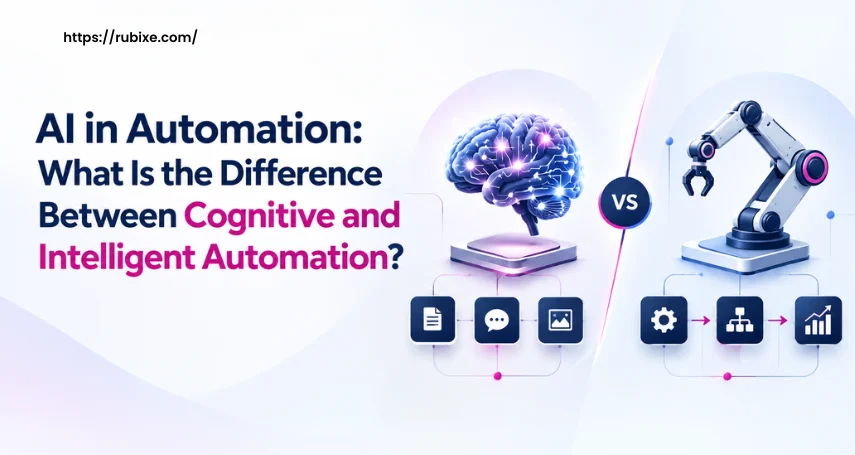
A finance team is testing a tool to process invoices. One team member wants it to read invoices, extract key details, and flag unusual entries for review. Another wants the system to validate the information, route approvals, update financial software, and prepare reports with less manual work. Both ideas involve AI in automation, but they address different business needs. One focuses on understanding and interpreting information, while the other can connect multiple tasks and systems to manage a larger workflow.
Understanding the difference between cognitive and intelligent automation helps businesses choose the right solution, identify where human review is still required, and estimate the level of integration a project may involve. Since vendors sometimes use these terms differently, comparing the actual capabilities, tasks, and outcomes of each system is more useful than relying on the labels alone.
What Is Cognitive Automation?
Cognitive automation uses technologies such as artificial intelligence (AI), natural language processing (NLP), and machine learning to handle tasks that require interpreting information. Traditional automation follows predefined rules. Cognitive automation can work with information that is less structured, such as emails, scanned documents, customer messages, and invoices.
For example, a finance team may receive invoices in different formats. A cognitive automation tool can extract details such as invoice numbers, dates, vendor names, and amounts. It may also flag missing information or unusual entries for an employee to review.
Common uses include:
- Document processing: Extracting information from invoices, forms, and contracts.
- Text classification: Sorting emails, support requests, and customer feedback.
- Pattern recognition: Identifying unusual entries or recurring trends in data.
- Information extraction: Finding relevant details in large volumes of text.
Cognitive automation is useful when a task involves understanding documents, text, or patterns rather than simply following a fixed sequence of steps.
What Is Intelligent Automation?
Intelligent automation combines AI capabilities with automation tools and workflows to handle tasks that may involve several connected steps. This approach to AI in automation can include robotic process automation (RPA), machine learning, document processing, and workflow management, depending on the system's design.
Consider the same invoice example. After extracting the invoice details, an intelligent automation workflow could check the information against purchase records, send the invoice for approval, update an accounting system, and notify the finance team when an exception occurs. The exact level of automation depends on the system's design, data access, business rules, and approval requirements.
Common uses include:
- Workflow coordination: Moving tasks between teams and systems.
- Invoice processing: Extracting details, checking records, and routing approvals.
- Customer service: Classifying requests and directing them to the appropriate team.
- Business operations: Connecting repetitive tasks across software applications.
- Exception handling: Flagging cases that need human attention.
Intelligent automation is useful when a business wants to connect multiple steps into a coordinated process rather than automate each task separately.
What Is the Difference Between Cognitive and Intelligent Automation?
The main difference is the scope of the work being automated. Cognitive automation focuses on interpreting information, while intelligent automation often combines AI with workflows to manage a broader process. These approaches can overlap, and cognitive capabilities can be part of an intelligent automation solution.
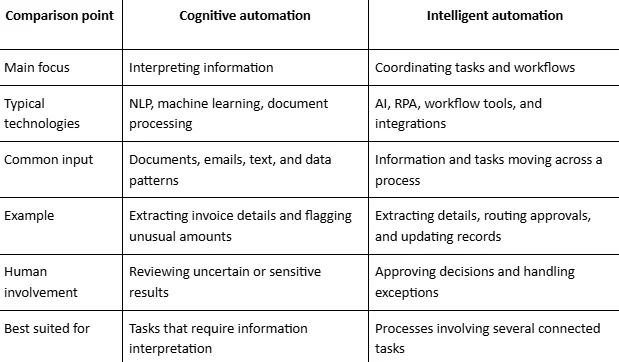
Cognitive and Intelligent Automation
These are practical distinctions, not strict technical boundaries. A solution can use both approaches, and the terms may vary across vendors.
Can Cognitive and Intelligent Automation Work Together?
Yes. Many business processes benefit from combining the two approaches.
Imagine a company that receives hundreds of supplier invoices each month. The process could work as follows:
- Read the invoice: AI extracts the supplier name, invoice number, date, and amount.
- Check the information: The system compares extracted details with available purchase records.
- Flag exceptions: Missing information, mismatched amounts, or unusual entries are sent for review.
- Route approvals: A workflow sends valid invoices to the appropriate manager.
- Update records: Once approved, the system updates the relevant accounting software.
- Track the outcome: The finance team receives status updates and can review unresolved cases.
In this example, cognitive capabilities help interpret the invoice, while workflow automation connects the remaining steps. The combination can reduce repetitive work, but it still requires reliable data, suitable integrations, and clear rules for exceptions.
How Should a Business Choose the Right Approach?
The right approach depends on the problem the business wants to solve. Start by reviewing the current process rather than selecting a tool based on its label.
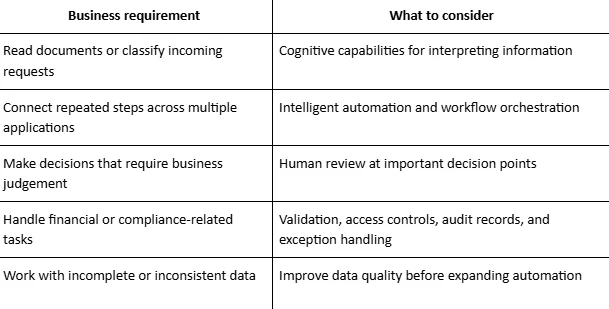
Before selecting a solution, businesses should ask a few practical questions:
- Which tasks consume the most employee time?
- Does the process involve structured data, unstructured documents, or both?
- Which software applications need to communicate with each other?
- What happens when the system produces an incorrect result?
- Which decisions must remain under human control?
- How will the team measure time saved, error rates, and process quality?
A small pilot can help answer these questions before the business commits to a larger implementation.
What Mistakes Should Businesses Avoid?
Automation projects can create extra work if the underlying process is poorly understood. A few common mistakes are worth addressing early.
- Choosing technology before defining the problem: Start with a specific task or bottleneck. A tool should address a clear business need rather than add complexity to an existing process.
- Assuming AI removes the need for human review: AI-generated results can be incorrect or incomplete. Set review rules for sensitive decisions, uncertain outputs, and exceptions.
- Ignoring data quality: Inconsistent records and missing information can affect the results of both cognitive and intelligent automation.
- Overlooking system integration: A tool may perform well on its own but struggle to fit into existing business software. Check data access, compatibility, and workflow requirements early.
- Measuring activity instead of outcomes: Track useful measures such as processing time, error rates, manual effort, and the number of cases requiring intervention.
Frequently Asked Questions
Is cognitive automation a type of intelligent automation?
Cognitive automation can be a component of an intelligent automation solution. The latter often combines AI capabilities with workflow tools and integrations to manage a wider process.
Does intelligent automation always use AI?
Not necessarily. The terminology varies by provider, and some solutions rely heavily on rule-based automation and workflow orchestration. Check which AI capabilities the proposed system actually includes.
Can cognitive automation work without human involvement?
Some tasks can run with little intervention when the input is reliable and the process is well-defined. Uncertain results and high-risk decisions may still require human review.
Which approach is better for a business?
Neither is automatically better. Cognitive automation may suit tasks that involve interpreting information, while intelligent automation may suit processes that connect multiple steps. Some businesses need both.
Conclusion
Cognitive and intelligent automation serve related but different needs. Cognitive capabilities help systems interpret information, while intelligent automation connects these capabilities with workflows, applications, and business rules. Businesses can start by identifying repetitive tasks, reviewing common errors, and deciding which steps can be automated safely.
Testing a focused solution and measuring its results helps teams make informed decisions before expanding automation. A structured AI approach to automation can help businesses review their data, systems, and team capabilities before implementation. Explore AI automation services to identify gaps and plan the next steps towards AI adoption.




.webp)