
 Sign up with Google
 Sign in with Zoho

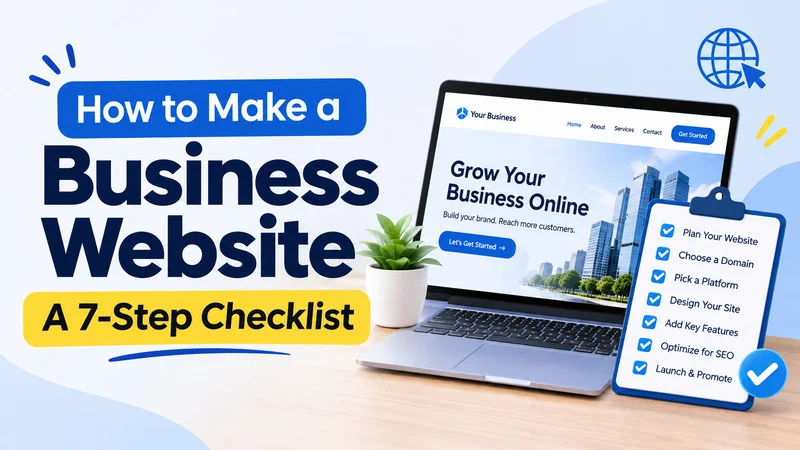
A business website is often the first thing a customer checks before calling, booking, or buying. If it is missing, outdated, or hard to use, many people simply move on to a competitor.
The good news is that you do not need to be a developer to get this right. If you have been wondering how to build a business website without wasting money or weeks of effort, this seven-step checklist walks you through the process in a sensible order. It is written for small business owners, freelancers, and first-time founders.
Step 1: Define Your Goal and Your Audience
Start with a plain question: what should your website do for you? Maybe you want phone calls, form submissions, online sales, or bookings. Pick one main goal, because a site that tries to do everything usually does nothing well.
Next, picture your ideal customer. What are they looking for, and what worries them before they buy? Write down three or four questions they ask you most often. Those questions will shape your pages later.
Step 2: Choose a Domain Name
Your domain is your address on the internet, so keep it simple. Short, easy to spell, and easy to say aloud is the goal. Use your business name if it is available, and avoid hyphens and unusual spellings that people will mistype.
A .com is still the most familiar choice, though a local or industry extension can work if the .com is taken. Domains usually cost a modest yearly fee, and it is worth registering it under your own account so you stay in control of it.
Step 3: Pick a Platform and Hosting
This is the decision most beginners worry about, so keep it practical. You generally have three routes:
- Website builders such as Wix, Squarespace, or Shopify. These bundle hosting and design tools, which suits owners who want to launch fast without technical work.
- WordPress with separate hosting. This gives more flexibility and control, but needs a little more setup and maintenance.
- A web designer or agency. This costs more but saves time if you have a complex project or no interest in doing it yourself.
Think about your budget, your comfort with technology, and how much the site will need to grow. If you are still working out how to build a business website on a tight budget, a builder is usually the quickest way to start. Check current pricing on each platform before you commit, since plans change often.
Step 4: Plan Your Pages and Structure
Before you design anything, list the pages you need. Most small business sites do well with:
- Home: a clear summary of who you help and what you offer
- Services or products: what you sell, with plain descriptions
- About: who is behind the business and why customers can trust you
- Contact: a form, phone number, address, and hours
- Optional extras: pricing, FAQs, a blog, or customer reviews
Sketch how visitors will move between them. Aim for a menu that anyone can understand in a few seconds, with no more than six or seven items.
Step 5: Design the Site and Write Your Content
Good design is mostly about clarity. Use a clean layout, readable fonts, and colors that match your brand. Leave generous white space, and put your main call to action, such as “Call now” or “Request a quote,” where visitors can see it without scrolling.
Write in plain language, as though you were explaining your service to a customer in person. Lead with the benefit, then explain how it works. Add real photos of your team, your work, or your products when you can, because genuine images build more trust than generic stock pictures.
Check how everything looks on a phone as well, since a large share of visitors will arrive on one.
Step 6: Set Up the SEO Basics and Tracking
Search engine optimization helps people find you. You do not need advanced tactics at the start, but a few basics matter:
- Give each page a clear title and a short description that includes what you do and where
- Use headings to organize content, with one main heading per page
- Add descriptive text to your images
- Create a Google Business Profile if you serve a local area
- Submit your site to Google Search Console
- Connect an analytics tool so you can see where visitors come from
Also add the legal essentials, such as a privacy policy, and make sure you use a secure connection (HTTPS). Many hosts and builders include this by default.
Step 7: Test, Launch, and Improve
Before you go live, click through every page and test every form and button. Submit a contact message yourself and confirm it reaches your inbox. Ask a friend or colleague to try the site and tell you where they got stuck.
Once you are happy, publish it and tell people. Share it on your social profiles, add it to your email signature, and update any directories that list your business.
Launch day is the start, not the finish. Check your analytics monthly to see which pages get visits and which ones lose people. Update your content, fix broken links, and add new pages as your business grows.
Common Mistakes to Avoid
- Trying to perfect the site before launching, which delays results by months
- Filling pages with industry jargon that customers do not use
- Hiding contact details or making them hard to find
- Ignoring mobile visitors
- Forgetting backups and updates, which can leave a site slow or vulnerable
- Using a domain or accounts registered under someone else’s name
Frequently Asked Questions
1. How long does it take to build a business website?Ans. A simple site can go live in a few days to a couple of weeks if your content is ready. Larger or custom projects take longer.
How much does a business website cost?Ans. Costs range from a low monthly fee for a builder to much higher amounts for custom design. Ask for written quotes and check what is included, such as hosting, domain, and support.
Do I need a blog on my business website?Ans. Not at the start. Focus on core pages first, then add a blog if you want to answer customer questions and attract search traffic over time.
Final Thoughts
Learning how to build a business website comes down to taking each step in order: set a goal, pick a domain, choose a platform, plan your pages, create clear content, cover the SEO basics, and launch. Do not wait for perfection. Publish a solid first version, watch how real visitors use it, and improve it a little each month. A simple, honest website that loads fast and answers customer questions will outperform a fancy one that confuses people.






.webp)