 Sign up with Google
 Sign in with Zoho
Learning management systems have made it easier for organizations to deliver courses, manage learners, and monitor training progress. However, completing a course does not necessarily mean that an organization understands how people learn, which activities improve performance, or where additional training is needed.
This is where a Learning Record Store (LRS) becomes valuable.
An LMS and an LRS serve related but different purposes. An LMS manages the learning experience, while an LRS collects and stores detailed records of learning activities. When these systems work together, organizations can gain a broader understanding of employee development, digital learning, and training effectiveness.
Understanding the Difference Between an LMS and an LRS
A Learning Management System is designed to organize and deliver training. It typically handles course enrollment, learning materials, assessments, completion tracking, and reporting.
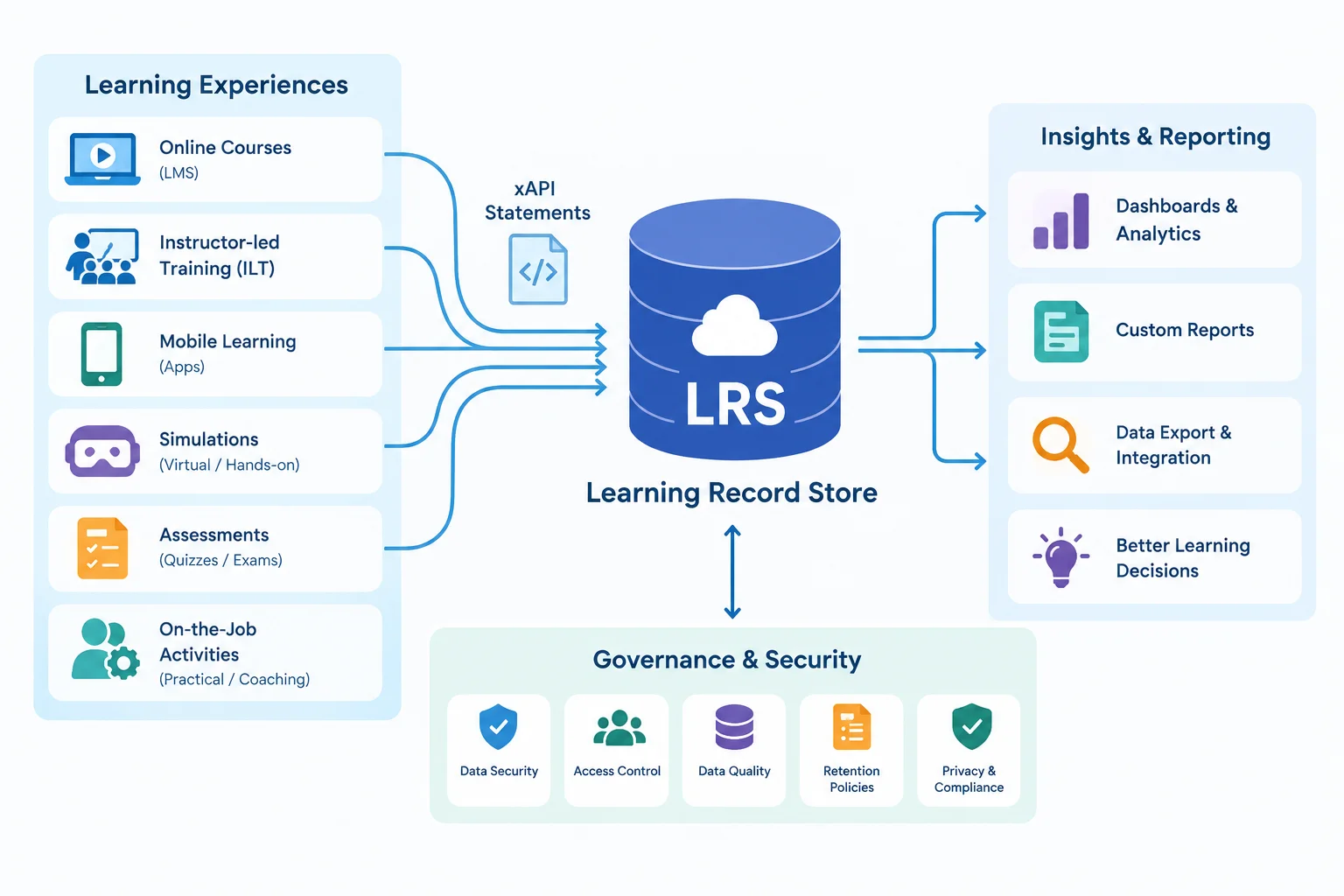
A Learning Record Store has a different responsibility. It receives and stores learning activity statements, usually through the Experience API (xAPI), also known as Tin Can API.
These statements describe learning activities in a structured format.
For example:
- A learner completed a safety training module.
- An employee watched a product demonstration.
- A participant passed an online assessment.
- A learner attended a virtual training session.
- An employee completed a practical learning activity outside the LMS.
An LRS can collect these records from multiple learning environments, giving organizations access to information that might otherwise remain scattered across different platforms.
Why Traditional LMS Reporting May Not Be Enough
Traditional LMS reports are useful for monitoring course completion, assessment scores, and enrollment information. However, modern workplace learning is not always limited to courses hosted inside one platform.
Employees may learn through mobile applications, webinars, simulations, external training providers, and instructor-led sessions.
When these activities take place across different systems, creating a complete picture of learning becomes challenging.
Consider a company that delivers compliance training through an LMS, product training through a separate application, and instructor-led workshops through a training provider.
Each platform may maintain its own records. Without a way to bring these learning activities together, managers may struggle to understand the employee's overall development.
LRS integration can help address this problem by collecting compatible learning records from different sources.
How xAPI Connects Learning Activities to an LRS
The Experience API, commonly called xAPI, provides a standardized way to describe learning experiences.
An xAPI statement generally follows a simple structure:
Actor + Verb + Object
For example:
- Actor: An employee
- Verb: Completed
- Object: A cybersecurity course
Together, these elements describe an activity in a structured format that an LRS can receive and store.
Unlike traditional SCORM tracking, which primarily focuses on learning activities within a course launched through an LMS, xAPI can capture a wider range of experiences when the relevant systems and content are configured to send statements.
This makes xAPI particularly useful for organizations that combine online learning, mobile learning, simulations, and workplace training.
Five Important Steps for Connecting an LMS to an LRS
A successful integration requires more than entering an endpoint URL. Organizations should consider the following steps.
1. Choose the Right LRS Architecture
Organizations can use an embedded LRS within their LMS or connect to a standalone LRS.
An embedded LRS may be sufficient when most learning activities take place within one platform.
A standalone LRS is useful when learning records need to be collected from several systems or made available to external analytics tools.
Larger organizations may also use statement forwarding to transfer records from multiple systems into a central repository.
2. Configure the Endpoint and Credentials
The LRS provides an endpoint that learning content or an LMS uses to send statements.
Administrators need to configure the correct endpoint, authentication credentials, and xAPI version.
Credentials should follow the principle of least privilege. Content systems generally need permission to submit statements, while reporting applications may require permission to retrieve them.
3. Check Learner Identification
Every learning statement needs to identify the actor responsible for the activity.
Organizations should decide how learners will be identified across their systems. A consistent identifier helps prevent duplicate or fragmented learner records.
For enterprise environments, this decision should also account for privacy, identity management, and changes to employee information.
4. Test the Integration
Before deploying the connection across an entire organization, send test statements and verify that they reach the intended LRS.
Administrators should check:
- Whether the endpoint is accessible.
- Whether authentication works correctly.
- Whether the required xAPI version header is present.
- Whether the actor and activity information is correct.
- Whether the statements can be retrieved from the LRS.
Testing with a small group first can prevent larger reporting problems later.
5. Validate Reporting and Data Flow
Successful transmission does not automatically guarantee useful reporting.
Organizations should confirm that statements contain meaningful information, that learner identities remain consistent, and that the reporting layer can interpret the collected data.
Common Integration Problems to Watch For
Even a properly planned integration can encounter technical problems.
Missing statements: The content may be published in SCORM format rather than xAPI, or the authoring tool may be pointing to an incorrect endpoint.
Authentication errors: Incorrect credentials or authentication methods can prevent the LRS from accepting statements.
Anonymous learner records: Missing or incorrectly configured actor information can make it difficult to associate activities with individual learners.
Duplicate records: Statements may be sent directly to a destination LRS while also being forwarded from another LRS.
Version incompatibility: Different content packages and systems may support different xAPI versions.
Testing each connection and checking the source of the statements can help administrators identify these problems more quickly.
Connecting Learning Technology With Better Training Management
LRS integration is one part of a larger learning technology strategy. Organizations also need systems that can manage training delivery, learner participation, assessments, and reporting.
For example, professional training providers and enterprise L&D teams often need to coordinate instructor-led training, virtual sessions, digital courses, and learner records.
Platforms such as SimpliTrain bring learning management and training management capabilities together, helping organizations coordinate training activities across different delivery formats.
The important consideration is not simply how many learning records an organization collects, but whether those records help managers make better decisions.
Final Thoughts
An LMS provides the structure for delivering and managing learning, while an LRS can extend the visibility organizations have into learning activities.
When connected through properly configured xAPI integrations, these systems can help bring together information from different learning environments.
The result is a more complete understanding of participation, progress, and learning activity. With consistent learner identification, reliable data transmission, and meaningful reporting, organizations can move beyond basic completion reports and build a stronger approach to measuring learning.