Sign up with Google
 Sign in with Zoho

Video has become a normal part of almost every digital platform.
OTT services add new titles to their libraries. Media companies publish interviews and news footage. Online communities receive videos from users throughout the day. Businesses use video for training, events, education, and communication.
All of that content creates another problem that isn't always visible to the viewer: someone has to make sure the content is suitable for publication.
When a platform has a small library, people can handle most of that work manually. But as the number of videos grows, watching every file from beginning to end becomes difficult to manage.
This is where a video moderation API can become useful.
Instead of treating moderation as a completely separate task, a platform can connect it to the systems it already uses for uploading, storing, reviewing, and publishing video. The moderation service checks the content, returns its findings, and gives the application information it can use to decide what happens next.
The goal isn't necessarily to remove people from the process. In many cases, it is about giving them better information and reducing the amount of repetitive checking they have to do.
What Is a Video Moderation API?
A video moderation API allows an application to send video content to a moderation service and receive the analysis in a format that software can work with.
The basic process is fairly straightforward:
Video uploaded → Content analyzed → Potential issues identified → Results returned → Platform decides what happens next
The final decision depends on the platform.
One video might pass the checks and continue toward publication. Another might need to be reviewed by a member of the moderation team. A third may need a section edited before it can be published.
This is where an API becomes particularly useful. The moderation check can happen as part of an existing content workflow instead of requiring someone to manually move the video into a separate system.
What Can a Video Moderation API Detect?
The exact capabilities depend on the provider, but modern video moderation systems can look at a variety of visual and audio signals.
Common examples include:
- Sensitive visual content
- Nudity
- Violence
- Weapons
- Alcohol and substance-related content
- Smoking and tobacco
- Offensive language
- Hate speech
- Privacy-sensitive information
- Obscene gestures
- Custom content-policy violations
The useful part isn't only identifying an issue. Some systems can also show where that issue occurs in the video.
Imagine a 40-minute video with one problematic scene lasting only a few seconds.
Without timestamps, a reviewer may have to search through the entire video. With timestamped moderation results, they can go directly to the relevant section and decide what needs to happen.
That small difference can make a noticeable impact when a team is dealing with a large amount of content.
Why Do Platforms Need a Video Moderation API?
The simple answer is volume.
Imagine an OTT service adding hundreds of hours of new content to its library every month. Every video needs to be checked against the platform's content policies before it reaches viewers.
A manual process might look something like this:
A reviewer watches the video, makes notes about anything that needs attention, identifies the relevant timestamps, sends the file for editing if required, and then checks the updated version.
That process isn't necessarily a problem when there are only a few videos.
The situation changes when there are hundreds or thousands.
User-generated platforms have an additional challenge. Uploads don't arrive in neat batches. A new video can be submitted at any time, which makes it difficult to depend entirely on manual checks before every piece of content becomes available.
An API allows the moderation step to happen automatically.
For example:
User uploads video → Platform stores video → API checks content → Results are returned → Platform decides the next step
The platform might then:
- Publish the video
- Hold it for review
- Restrict access
- Add a warning
- Blur a specific section
- Mute or beep part of the audio
- Remove selected content
- Reject the upload
The exact workflow depends on the platform's own policies.
The important thing is that the decision can be made within the same content pipeline instead of creating another manual process for the operations team.
How Does a Video Moderation API Work?
There isn't a single implementation that every provider follows, but the overall process tends to be similar.
1. The Video Is Submitted
The application first needs to provide the video to the moderation service.
Depending on the API, this could mean submitting a video URL, uploading the media, or using another supported input method.
From the developer's perspective, this should ideally feel like another API call within the existing content workflow.
2. The Video and Audio Are Processed
Video is different from an image because the content changes continuously.
A frame that looks completely normal can be followed by something that requires attention a few seconds later. For that reason, moderation systems may examine frames and scenes throughout the video.
Audio is another part of the equation.
A video may appear harmless visually while its soundtrack contains language that violates the platform's rules. Checking only the visual track would leave that part of the content unchecked.
A more complete moderation process considers both:
What is being shown + What is being said
This becomes especially important for platforms publishing interviews, livestreams, podcasts, educational material, or user-generated videos.
3. The Content Is Compared Against Policy Rules
Not every platform has the same definition of acceptable content.
A children's education platform may have very different requirements from a news publisher or an entertainment service.
Some platforms may want to monitor particular visual categories. Others may need stricter controls around language, privacy, or audience suitability.
Configurable moderation rules allow the platform to decide what should be flagged.
This is also useful when a company operates multiple products with different audiences. The same video doesn't necessarily need to go through the exact same moderation process everywhere.
4. The API Returns the Findings
The difference between a basic moderation result and a useful one often comes down to detail.
A response that simply says:
"Video failed moderation."
doesn't tell a reviewer much.
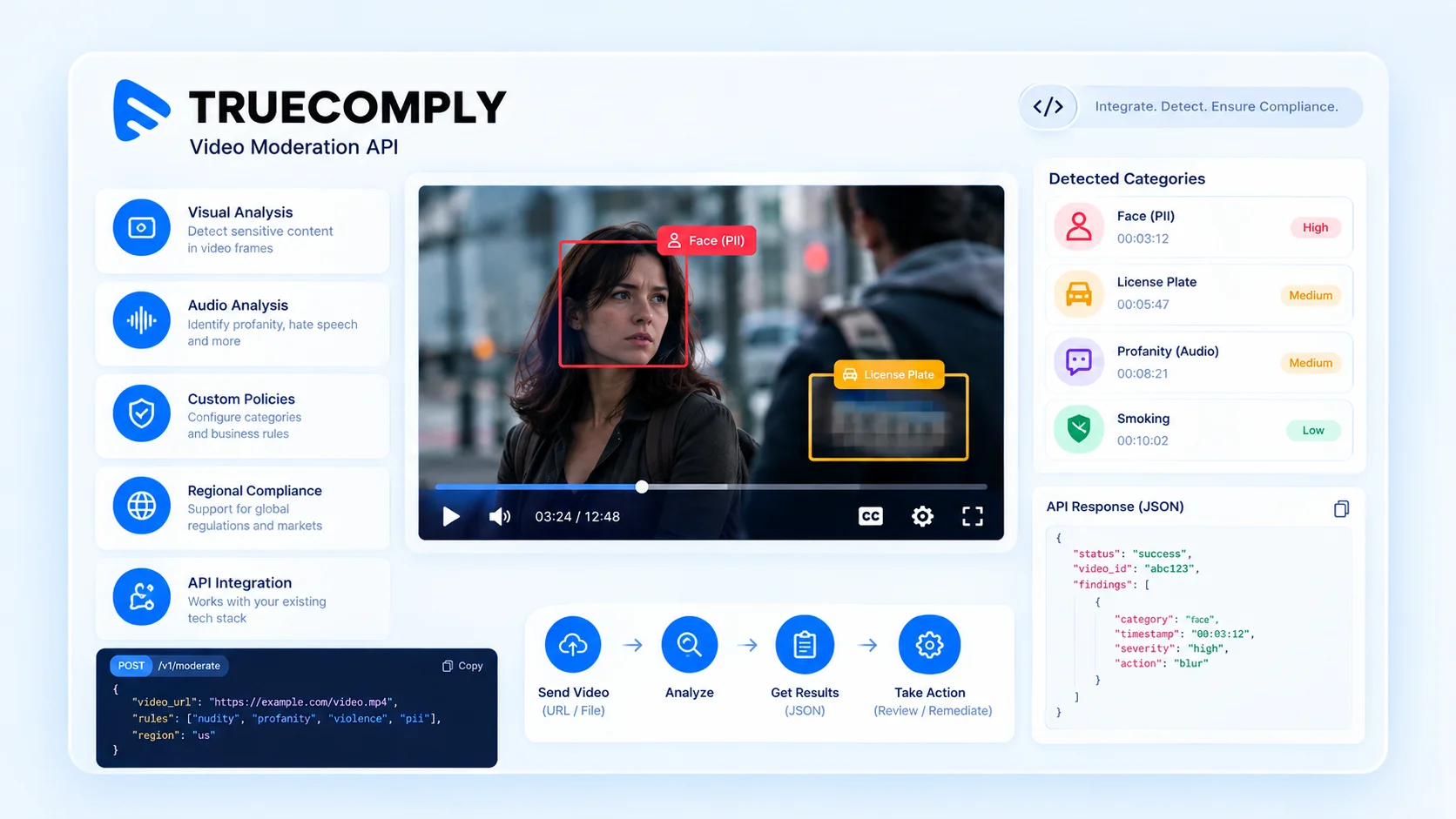
A more useful response could identify the type of issue, its location, and its severity.
For example:
Now the moderation team has something actionable.
The same information can also be consumed by software. A CMS could hold the video for review, while another workflow could automatically trigger an approved action for a specific type of finding.
Why Audio Moderation Matters
It is easy to focus on what appears on screen and forget about everything the viewer hears.
Consider a video of an interview.
The visuals may be completely acceptable, but the conversation could contain offensive language or other terms that conflict with the platform's policies.
A visual-only moderation process would not catch that.
Audio analysis can therefore be an important part of a broader moderation workflow. Depending on the system, it can help identify spoken words, phrases, offensive language, and other audio-related risks.
Language support matters here too.
A platform serving viewers in several countries may receive content in multiple languages. The moderation system needs to understand those differences if the platform wants consistent results across its library.
What Happens After a Video Is Flagged?
Detection is only the beginning.
Suppose a moderation system identifies a sensitive moment at 18 minutes and 42 seconds into a video.
Someone still needs to decide what to do with it.
Should the video be rejected?
Should the section be edited?
Does the content require a warning?
Should a reviewer take a closer look?
The answer depends on the context and the platform's rules.
This is why review and remediation are important parts of the overall moderation workflow.
A platform may want moderators to jump directly to the flagged section, inspect it, and then choose an action. Depending on the system, available actions can include blurring a visual area, muting or beeping audio, adding a label, or removing selected frames.
The distinction is important for developers.
An API that only identifies a problem still leaves the application to build everything that comes afterward.
A more complete moderation workflow can provide the detection, timestamp, review information, and output needed to move the content toward its final state.
Video Moderation and Regional Compliance
Content policies can also vary between markets.
A platform serving audiences in the United States may have different requirements from one operating in India, the United Kingdom, Germany, Singapore, or Australia.
This is where regional moderation profiles can be useful.
Rather than applying exactly the same rules to every piece of content, a platform can configure its moderation workflow around the requirements that apply to a particular market.
For companies operating internationally, that can make content management considerably more complicated than simply asking whether a video is "safe."
The system also needs to know which rules apply to that content and where it is being published.
For example, TrueComply provides regional moderation profiles covering frameworks including FCC, COPPA, India's IT Rules, Ofcom, the Online Safety Act, AVMSD, DSA, ACMA, IMDA, and JMStV.
What Makes a Video Moderation API Useful at Scale?
The number of categories a moderation system supports is only one part of the picture.
A system can identify a large number of content types and still create more work for a moderation team if the results have to be manually transferred between different tools.
The more practical question is:
Can moderation become part of the workflow the platform already uses?
For a high-volume video operation, useful capabilities can include:
- Automatic content submission
- Video and audio analysis
- Configurable moderation rules
- Timestamped findings
- Structured API responses
- Human review workflows
- Automated routing of flagged content
- Remediation options
- Preservation of the original video
- Creation of a moderated version
- Integration with a CMS or media library
When these pieces work together, moderation becomes another stage in the content pipeline.
That is generally easier to manage than having one team handle uploads, another team run moderation, and another system handle editing and publishing.
Video Moderation API vs Manual Moderation
Manual moderation isn't going away.
There will always be situations where context matters and someone needs to make a judgment that software can't make reliably on its own.
The problem is asking human reviewers to perform every check from start to finish.
An API can take care of the first pass.
It can examine the content, identify moments that deserve attention, and provide the information a reviewer needs to investigate them.
Instead of watching every minute of every video, the moderation team can spend more time on the cases that actually require human judgment.
That doesn't eliminate human review.
It makes better use of it.
For platforms handling large libraries, this distinction can have a significant impact on how much content a moderation team can manage.
How Does a Video Moderation API Fit Into a Content Stack?
A moderation API doesn't have to replace a platform's existing infrastructure.
In many cases, it sits alongside the systems already responsible for video storage, content management, encoding, publishing, and delivery.
A simplified workflow might look like:
Upload → Storage → Moderation → Review → Encoding → CDN → Player
The actual order can vary.
A user-generated platform might moderate immediately after upload. An OTT service might check content before publication. A media company could run compliance checks after content ingestion but before sending the asset to its delivery infrastructure.
The advantage of an API is flexibility.
Developers can place the moderation step where it makes the most sense for their application rather than rebuilding the entire video workflow around the moderation provider.
Muvi TrueComply as a Video Moderation API
For platforms that want to add automated compliance checks to an existing video workflow, Muvi TrueComply provides an API-based approach.
The platform can analyze video and audio for sensitive content, identify flagged moments, generate timestamped results, and support review and remediation workflows. TrueComply currently supports detection across 95 languages and provides configurable moderation categories.
Its workflow is designed to go beyond simply identifying an issue.
Teams can review flagged moments and apply actions such as blur, watermark, frame removal, beep, or mute when a moderated version of the content is required. The original asset can also be preserved separately from the processed version.
For larger video operations, the API can be integrated into existing systems. The workflow can submit the video and compliance rules, process the content, return structured results, and send the processed output back to a CMS or media library.
This approach makes sense when moderation needs to happen alongside the rest of the video lifecycle rather than in a separate application.
What Should You Look for Before Choosing a Video Moderation API?
It's tempting to compare providers based on the number of detection categories they list.
That's a useful starting point, but it shouldn't be the only consideration.
Detection capabilities
Start by checking whether the service can identify the types of content your platform actually needs to monitor.
Video and audio analysis
Make sure the system can examine the audio track if spoken content is part of your moderation requirements.
Timestamp precision
A useful timestamp can save a reviewer from searching through an entire video to find a single issue.
Custom moderation rules
Different platforms have different policies. Custom rules can be useful when a fixed set of categories isn't enough.
Structured API responses
Developers should be able to take the returned findings and use them inside their own application without having to manually interpret the response.
Review workflow
Automation shouldn't mean removing humans from every decision. Check whether the system makes it easy for reviewers to inspect and approve or reject flagged content.
Remediation
Consider what happens after a problem is found. Features such as blur, mute, beep, labels, or frame removal can make the overall workflow much easier to manage.
Language support
If the platform operates internationally, check which languages are supported for audio and content analysis.
Deployment options
Cloud deployment may work well for some organizations, while others may need on-premise or hybrid infrastructure because of their operational requirements.
Integration
Finally, look at how easily the API connects with the systems you already use.
A moderation service can have excellent detection capabilities and still be difficult to adopt if integrating it into the existing CMS, storage, or publishing process requires extensive development work.
Frequently Asked Questions About Video Moderation APIs
What is a video moderation API?
A video moderation API allows software to send video content to a moderation service and receive information about potentially problematic content.
The application can then use those results to decide whether the video should be published, reviewed, restricted, or modified.
How does a video moderation API work?
The application submits a video to the moderation service. The service analyzes the content and returns findings such as detected categories, timestamps, and severity information.
The platform then decides what should happen based on its own policies.
Can a video moderation API analyze audio?
Yes, depending on the provider.
Audio analysis can identify spoken words, phrases, offensive language, and other audio-related risks. Multilingual support can be particularly useful for platforms serving audiences across multiple markets.
Can a video moderation API detect sensitive scenes?
Many modern systems can identify different types of sensitive visual content and provide information about where those moments occur.
The exact categories and detection methods vary between providers.
Can video moderation be automated?
Yes.
The submission of content, analysis, reporting, routing, and some remediation steps can all be automated.
Human review can still be included when a decision requires additional context.
Can a video moderation API modify videos?
Some providers offer remediation alongside detection.
Depending on the system, this may include blurring a section, muting or beeping audio, removing selected frames, or adding labels to the final video.
Can a video moderation API connect with a CMS?
Yes.
This is one of the main benefits of an API-based approach. Moderation can be connected with the CMS, media library, storage layer, publishing workflow, or streaming infrastructure already being used by the platform.
Does video moderation support multiple languages?
That depends on the provider.
For global platforms, language coverage is important because the system may need to understand spoken content in several languages rather than treating every video as an English-language asset.
What is the difference between a video moderation API and a video moderation platform?
A video moderation API is primarily an integration layer that allows software to communicate with a moderation service.
A broader moderation platform can include the API as well as reviewer tools, reports, policy controls, remediation features, and other operational capabilities.
What should you consider before choosing a video moderation API?
Look at more than the detection categories.
Consider video and audio support, timestamp accuracy, custom rules, language coverage, API documentation, structured responses, review workflows, remediation capabilities, deployment options, security, scalability, and integration with your existing infrastructure.
The best option is usually the one that fits naturally into your current content workflow.
Where Are Video Moderation APIs Heading?
Video moderation is becoming less of a separate operation and more of a normal part of the publishing process.
That shift makes sense.
If a platform waits until a video has already been published before checking it, fixing a problem becomes much harder. The content may already have reached viewers, and the moderation team then has to deal with the issue after the fact.
A better approach is to check content earlier.
A new upload can go through an automated first pass. Videos that don't raise concerns can continue through the publishing workflow, while anything that needs attention can be sent to a reviewer.
If the issue can be handled automatically, the system can create a suitable version of the video before publication.
This changes the question developers should ask when evaluating a moderation API.
Instead of asking only:
Can it detect sensitive content?
it is worth asking:
Can it become part of our existing video workflow?
That distinction becomes more important as the content library grows.
A platform processing thousands of videos needs more than a tool that produces a list of findings. It needs a process that can move content from upload to review and, when necessary, remediation without creating unnecessary manual work.
The workflow might look something like:
Upload → Check → Review when needed → Remediate → Approve → Publish
That makes moderation a regular part of content operations rather than a bottleneck that gets harder to manage every time the video library grows.