Sign up with Google
 Sign in with Zoho
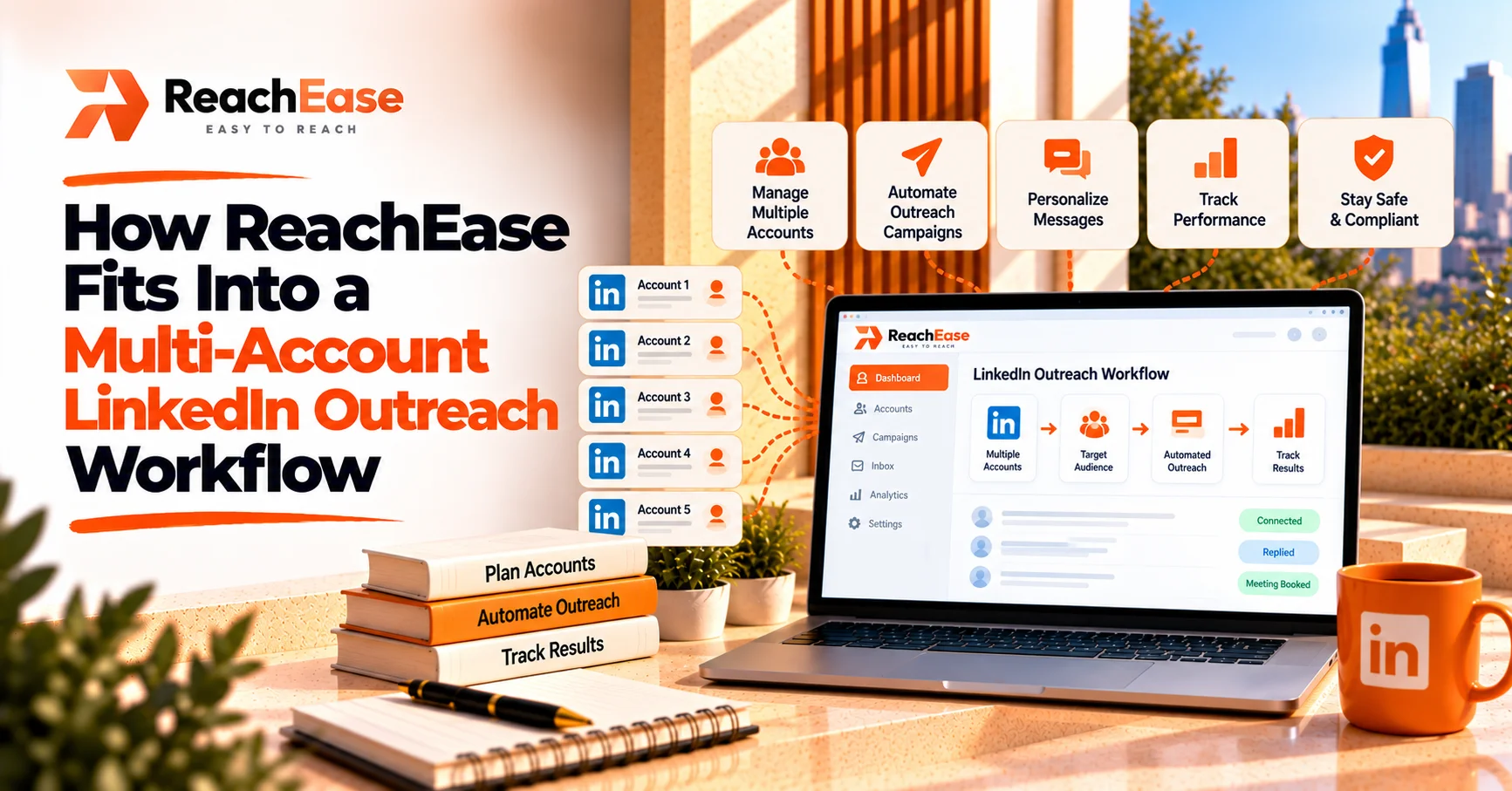
It covers the middle of the workflow, the part that is hardest to run by hand. You bring the leads and the message. The platform connects your accounts as senders, balances sending across them, runs branching sequences, and gathers every reply in one inbox. Writing, targeting, and replying to people stay with you.
A multi-account outreach workflow has more moving parts than most people expect. Leads come from one place, messages go out from several accounts, and replies come back to all of them. ReachEase is built to sit in the middle of that flow, and this guide maps where it fits stage by stage, what still depends on you, and what it costs. If you are comparing linkedin outreach software for a team or agency, this is the workflow view to hold it against.
The Workflow in Six Stages
Anyone who has run campaigns across several accounts will recognize these stages. The table shows who does what.
Where the Hours Usually Go
Short answer: Most time is lost on coordination, not on sending. That means remembering who is due a follow-up, switching between logins, and checking several inboxes for replies.
LinkedIn allows roughly 100 connection invitations per account per week, on every plan. So more reach means more accounts, and more accounts mean more coordination. Without a system, five accounts become five logins, five inboxes, and a lot of memory work. That is the gap this kind of linkedin outreach software is designed to close.
What Stays Manual, and Should
It is easy to overstate what any tool does. Here is the honest split.
- You choose the audience. A relevant list matters more than a large one.
- You write the message. The platform schedules and branches. It does not write for you.
- You answer the people who reply. A reply kill-switch stops automated steps once someone responds, so a real conversation never gets a scheduled message dropped into it, but the answer is yours.
- You own the risk decision. LinkedIn does not permit third-party automation, and no tool can promise an account will never be restricted. Warm-up, daily limits, and working-hour controls reduce risk. They do not remove it.
A Practical Example
An agency runs outreach for three clients with two accounts each, six senders in total. They create a workspace per client and import each client's leads. Each client gets its own branching sequence: connect, wait, message if accepted, a lighter touch if not. New senders ramp up gradually while established ones keep pace. Replies from all six accounts land in the shared Unibox, tagged by lead status. On Momentum plans and above, Telegram alerts flag replies as they arrive, with an AI-drafted response to review.
The agency spends its time on messaging and conversations, not on logging in and out.
What It Costs
ReachEase is a one-time software licence. The only recurring cost is a small infrastructure fee for each connected sender. The two numbers are shown separately on purpose.
Ignite does not include Telegram alerts or the mobile Unibox. Higher plans do. The $9 trial is a low-cost way to test pacing and the inbox before choosing a plan. See the pricing page for current details.
One-time payment for lifetime software access, plus a minimal recurring per-sender infrastructure cost.
Where It Is Not the Right Fit
It suits teams and agencies running several accounts over a longer period. Someone who needs one account for a month or two, on a small budget, may be better served by a simpler monthly tool. It is also not a lead-sourcing or scraping product. Its job starts once you have leads to work.
What to Plan For
- Count your senders. Divide your weekly reach goal by 100.
- Choose the plan by sender and workspace count. Agencies usually need more than one workspace.
- Warm up new senders. Do not start them at full volume.
- Decide who owns replies. More reach means more responses to handle.
Frequently Asked Questions
- Where does ReachEase fit in an outreach workflow?
- It handles the middle: connecting senders, balancing and pacing sends, running branching sequences, and collecting replies. You supply the leads, the message, and the conversations.
- Does ReachEase raise LinkedIn's sending limits?
- No. Each account stays inside LinkedIn's roughly 100-invitation weekly limit. Reach grows by adding senders.
- Is the software really a one-time payment?
- The licence is. Each connected sender also carries a recurring infrastructure cost of $8 to $12 a month, depending on the plan.
- Can it guarantee my accounts will not be restricted?
- No. No tool can. Its controls reduce risk but do not remove it.
- Is ReachEase affiliated with LinkedIn?
- No. ReachEase is an independent product and is not affiliated with, endorsed by, or sponsored by LinkedIn.
Final Thoughts
A multi-account workflow works when each stage has an owner. You own the audience, the message, and the replies. A platform like ReachEase owns the coordination in between, so adding accounts adds reach without adding chaos.