Sign up with Google
 Sign in with Zoho


Overview
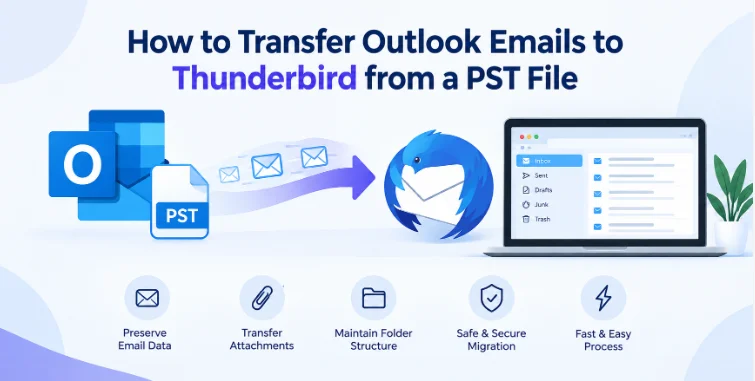
Microsoft Outlook and Mozilla Thunderbird employ different file formats to store your e-mail data. Outlook stores messages, contacts, calendars and other information about the mailbox in PST files. Thunderbird stores email messages in the MBOX format. This difference is why users migrating from Outlook to Thunderbird can't simply copy a PST file into the Thunderbird profile and expect it to work.
The PST to MBOX conversion offers a feasible solution to migrate Outlook emails to Thunderbird and retain all essential mailbox information. In this guide, we will discuss what is PST and MBOX, why conversion is necessary, manual methods, tool-based approach, compatibility, best practices, and frequently asked questions.
What Is PST And MBOX?
PST (Personal Storage Table) is a Microsoft Outlook data file that stores mailbox data locally. Depending on the setup of Outlook it can contain emails, attachments, contacts, calendars, notes and other items.
MBOX (Mailbox) is a popular format for storing emails. It is used by a number of email clients, such as Mozilla Thunderbird. Unlike PST, which is a proprietary format owned by Microsoft, MBOX is supported by multiple applications and is well suited for storing collections of email messages.
Both the formats have a different structure, therefore it is required to convert PST data into MBOX while importing Outlook emails to Thunderbird.
The Importance of PST to MBOX Conversion
PST to MBOX conversion is important when organisations or individuals migrate from Outlook to Thunderbird. A successful conversion can rescue years of email communication from being lost by manually forwarding or recreating messages.
It can also help you switch between operating systems, wean yourself off Outlook, consolidate old email archives or keep old email archives accessible. A good conversion should keep important information such as email headers, folders, message content, and attachments wherever supported.
Migrate PST to MBOX Manually
There is no direct export to MBOX from PST available in the Outlook built-in options. But users can try indirect methods of migration.
Using Thunderbird and Outlook Together
1. Setup and install Thunderbird on the machine.
2. Verify that Outlook is installed and the required PST data is present.
3. Import Outlook data into Thunderbird using existing import functionality.
4. Let Thunderbird process the imported mailbox data.
5. Open Thunderbird profile folder after migration.
6. Find the mailbox files saved in MBOX compatible format.
7. Keep the required MBOX files in a safe place.
8. Add or Import them to any Thunderbird profile you want.
Benefits
· A conversion application may not be required.
· Ideal for someone who’s moving a small mailbox.
· Utilises widely available email applications.
Drawbacks
· The process may depend on the versions of Outlook and Thunderbird.
· Import options may differ between operating systems and application releases.
· It takes a lot of time to process large PST files.
· Complex folder structures may need some additional organization.
· Failed or incomplete imports can make troubleshooting more difficult.
· Attachment and other mailbox attribute consistency may be difficult to maintain.
Due to these limitations, manual migration is usually more appropriate for small or simple mailboxes.
Tool-Based Approach: Using a PST to MBOX Converter Tool
If you are having a large PST archive or you want a more direct workflow, a dedicated conversion application can make the migration easier. GainTools PST to MBOX Converter is a simple tool that can convert Outlook PST data into MBOX format without any intermediate step.
Step-by-Step Process
Step 1: Installing the converter
Download the app on a Windows computer and run it.
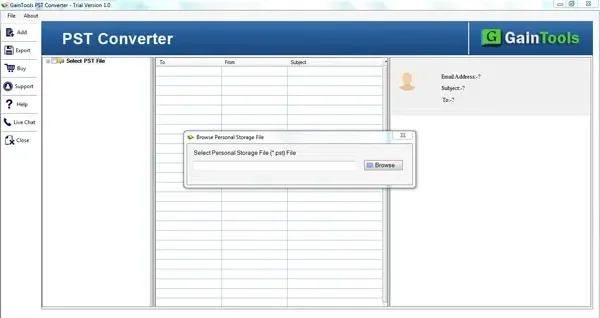
Step 2: Add PST file
Browse the location of Outlook PST file and load it to the software. If there are multiple files, add the required PST data according to the selection options supported by the application.
Step 3: Preview mail box items
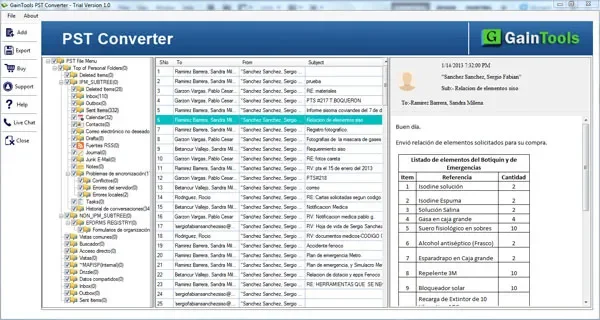
Confirm the application displays the following folders and email items. Previewing confirms the required Outlook data has been detected before conversion.
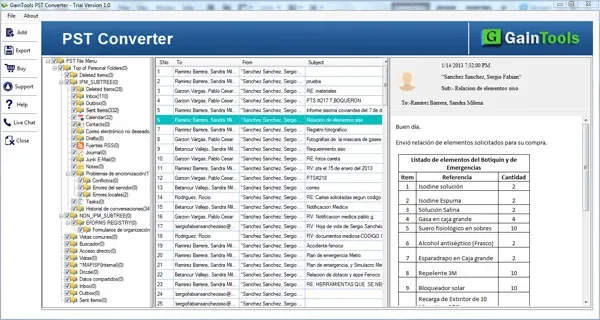
Step 4: Choose the folders you need
You can select individual folders or the whole mailbox structure, depending on your migration requirements.
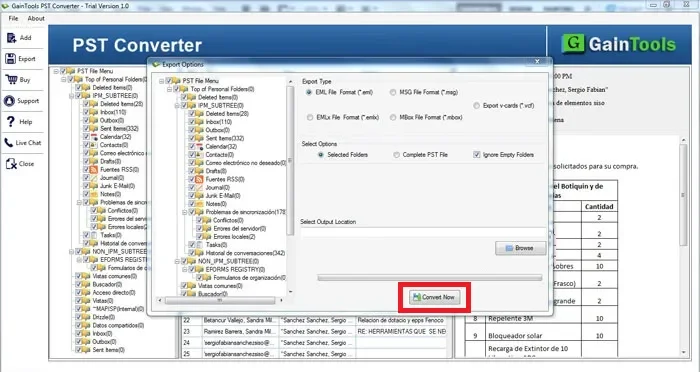
Step 5. Select MBOX as output format
Choose MBOX as the target format and select a suitable output location.
Step 6: Begin conversion
Start the conversion process and let the application create the MBOX files.
Step 7: Import MBOX to Thunderbird
Open Thunderbird and use a suitable MBOX import method or appropriate import extension to import the converted mailbox files into the required profile.
Step 8: Verify migrated emails
Open the folders, check the content of the messages, check the attachments, and verify that the important e-mails are present after migration.
Advantages and Compatibility
No MS Outlook Required (Outlook Independence): It functions as a fully independent utility. You do not need to have Microsoft Outlook installed, configured or running on your machine for converting PST files to MBOX format.
Meta-Properties and Complete Data Integrity: Accurately converts all email properties and headers like To, From, CC, BCC, sent/received dates and in-line images or hyperlinks.
Keeping the Folder Structure: It keeps the exact original directory structure and layout of your Outlook mailbox (Inbox, Sent Items, Outbox and custom subfolders) without messing up or losing files.
Complete Item & Attachment Extraction: Extracts all mailbox items such as emails, attachments, notes, journals, contacts and calendars easily and ensures attachments are extracted intact with their respective message.
Folder Migration Filter: The program offers deep file browsing and filtration options allowing users to select and export specific folders instead of migrating the entire PST archive.
Integrated Preview Feature: It has an intuitive scanning and preview window that displays a breakdown of the folder counts, item lists and email details before you go for the final conversion ensuring the accuracy.
Safe & Read-Only Extraction: Built with a non-destructive architecture that runs in read-only mode, so your original PST file stays completely unaltered, uncorrupted and secure throughout the process.
If you only have a few emails to migrate every now and then, a manual approach may suffice. For large archives, multiple folders or repeated migrations, however, a specialised converter is typically more convenient.
The main advantage is simplicity. Users can convert source PST to Thunderbird-compatible email format and then import the resulting MBOX files, rather than using multiple applications and intermediate processes. This can save you manual effort, reduce migration errors and make mailbox organization easier to manage.
Best Practices
Take a backup copy of original PST file before conversion. Never alter or overwrite the only copy of important email data.
Then, verify that the PST file is healthy and uncorrupted and also make sure there is enough storage space for the converted files and the profile data of Thunderbird. If you have large archives, think about converting folders in reasonable batches.
Verify representative emails from different folders after conversion. Check attachments, dates, senders, recipients and folder organization. Another safeguard is to retain the original PST until the migration is completely validated.
FAQs
1. Can I save emails as MBOX directly in Outlook?
By default, Outlook doesn’t have a direct export feature from PST to MBOX. This may involve an indirect method of migration or special conversion software.
2. Does Thunderbird use PST files?
No Thunderbird primarily uses MBOX and other supported mailbox formats, not Outlook's PST.
3. Are attachments converted?
A correctly designed converter can maintain attachments with the messages they belong to, but users should still verify the output after migration.
4. Is it possible to convert selective Outlook folders?
There are many dedicated conversion apps that offer folder selection options. This can be useful when you do not want to move the entire PST archive.
5. Can I delete the PST file after conversion?
Nope. Do not delete the original PST file until you have verified the converted MBOX files completely and the migration has been successfully completed.
Conclusion
PST and MBOX are different mailbox formats, thus you require a proper migration method to move Outlook emails from PST to Thunderbird MBOX. Manual methods work for small migrations but can be multi-step and have compatibility limitations. A dedicated converter is a more streamlined option, especially for large archives and structured mailbox migrations.
When done properly, this conversion and post-migration verification ensures that users can move their Outlook email archives to Thunderbird and still have access to the important historical correspondence.