
 Sign up with Google
 Sign in with Zoho

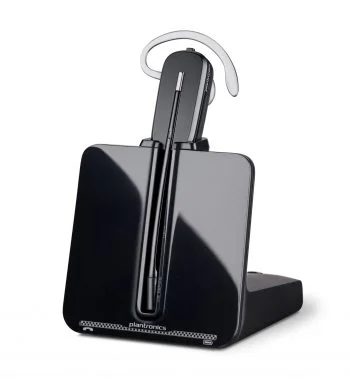
Clear communication has become an essential part of modern working life. Whether someone is attending online meetings, managing customer calls, working remotely, or collaborating with colleagues across different locations, having reliable audio equipment can make everyday tasks easier. Headsets play an important role in this process by helping users hear conversations clearly while reducing distractions. Plantronics headsets have long been associated with professional communication, office environments, and hands-free calling.
Today, the Plantronics name is part of the HP Poly brand. Its headset range includes wired USB, Bluetooth, and DECT wireless options designed for different working environments. Understanding the available features and connection types can help individuals and businesses choose equipment that suits their communication needs.
The Evolution of Plantronics Headsets
Plantronics developed its reputation by focusing on practical audio solutions for professional communication. Its headsets became familiar in offices, customer support departments, and other workplaces where employees needed dependable equipment for regular conversations.
The brand later became part of Poly, which was subsequently acquired by HP. Products that were previously sold under the Plantronics and Poly names are now included in HP's broader collaboration portfolio.
Although the branding has changed, many users still search for Plantronics headsets when looking for replacement equipment, product information, or compatible accessories. Understanding this transition is useful when checking product availability and support information.
Different Types of Headsets for Different Work Environments
Not every workplace has the same communication requirements. A person working from home may need a lightweight headset for occasional video meetings, while a customer service representative may require equipment suitable for continuous calls.
Wired USB headsets are a practical option for desktop computers and laptops. They generally offer straightforward connectivity and do not require battery charging. Models in the HP Poly Blackwire range provide examples of professional USB headset designs.
Bluetooth headsets are useful for people who move between workspaces or regularly switch between a computer and mobile phone. Depending on the model, wireless connectivity can provide greater freedom without the inconvenience of cables.
DECT wireless headsets are commonly considered in office and contact centre environments where users need to move around while remaining connected to their communication systems. The right option depends on the workplace setup and supported devices.
Important Features to Consider
When choosing a headset, sound quality should be one of the first considerations. Clear audio helps users follow conversations, understand instructions, and avoid repeatedly asking others to speak again.
Microphone performance is equally important. A noise-reducing microphone can help limit unwanted background sounds, which is particularly useful in shared offices, busy customer support departments, and home workspaces.
Comfort also matters when a headset is used throughout the day. Adjustable headbands, suitable ear cushions, lightweight construction, and flexible microphone positioning can make regular use more comfortable.
Other features worth checking include inline call controls, mute functionality, wireless range, battery performance, and compatibility with communication software. Not every model includes the same features, so reviewing individual specifications is important before making a purchase.
Wired or Wireless: Which One Should You Choose?
Choosing between wired and wireless connectivity depends largely on how a headset will be used.
A wired headset can be a sensible choice for someone who works mainly at a desk. It does not need regular charging and can often connect directly through a USB port. This makes it convenient for employees who attend scheduled meetings or handle calls from a fixed workstation.
Wireless headsets offer more flexibility. They can be useful for employees who need to stand up, move around an office, or switch between compatible devices. However, buyers should consider battery life, charging requirements, connection stability, and wireless range.
Before choosing either option, check whether the headset supports the computer, mobile phone, desk phone, or conferencing equipment used in the workplace.
Plantronics Headsets for Remote and Hybrid Work
Remote and hybrid working have changed how people communicate with colleagues and customers. Many employees now participate in several online meetings throughout the day, often from home or shared workspaces.
A suitable headset can help create a more consistent communication experience. It keeps audio close to the user's ears and positions the microphone near the speaker's mouth, which can make conversations easier to manage.
For remote workers, comfort and microphone quality are especially useful considerations. People who regularly move between a laptop and smartphone may also benefit from a compatible Bluetooth model.
However, the most expensive headset is not always necessary. Occasional meeting participants may need a simple USB option, while employees handling calls for several hours may benefit from a model with additional comfort and noise-management features.
Checking Compatibility Before Buying
Compatibility is an important part of selecting any professional headset. A device that works with one computer or communication system may not support every feature on another.
Check the connection type, operating system requirements, supported communication platforms, and available call controls. Some models are designed for particular workplace applications or have different versions for specific collaboration software.
It is also worth checking whether the headset requires a USB adapter, charging base, or additional accessories. If replacing an older Plantronics headset, confirm the exact model number and connector type rather than assuming that a newer product will use the same connection.
The official HP Poly product catalogue and support resources can help users identify current products and compatibility information.
Maintaining a Headset for Long-Term Use
Regular maintenance can help keep professional audio equipment in good condition. Clean the ear cushions and microphone area according to the manufacturer's instructions, and avoid exposing the headset to excessive moisture or heat.
For wireless models, follow the recommended charging guidelines and store the headset safely when it is not being used. Wired models should be handled carefully to prevent cable damage, particularly around connectors and joints.
If audio quality suddenly changes, check the connection, microphone settings, and software configuration before assuming that the headset has developed a hardware problem. Firmware updates may also be available for supported devices.
Conclusion
Plantronics headsets remain a familiar choice for people researching professional communication equipment, even though the brand is now part of HP Poly. With wired USB, Bluetooth, and DECT options available across the wider product range, users can compare different solutions for office work, remote meetings, and customer communication.
The best choice depends on comfort, audio clarity, microphone performance, connectivity, and device compatibility. Taking time to understand these factors can help individuals and businesses select a headset that supports productive and reliable everyday communication.