Sign up with Google
 Sign in with Zoho
.webp)

IT help desks handle a constant flow of requests. These can range from simple access issues to critical system failures. Managing these requests efficiently is essential to keep business operations running without disruption.
Many IT teams still rely on emails, chat messages, or basic ticketing systems. While these methods capture requests, they often fail to provide a clear view of ongoing work. This is why more teams are moving towards a task management app that brings all activities into one structured system.
Challenges in Traditional Help Desk Operations
Handling support requests is not just about resolving issues. It involves tracking, assigning, prioritising, and following up on tasks.
One common issue is scattered communication. Requests come through emails, calls, and internal chats. This makes it difficult to track all tasks in one place.
Another challenge is unclear ownership. When tasks are not assigned properly, they may remain pending or get delayed. Teams also face difficulty in tracking progress, especially when multiple requests are handled at the same time.
Without a clear system, it becomes hard to maintain consistency in response times and service quality.
Moving Towards a Unified Task System
A unified system brings all help desk activities into a single workflow. Instead of managing requests across different platforms, everything is handled within one structure.
Using a task management app, each support request is converted into a task. This task includes details such as priority, assigned team member, and expected resolution time.
This approach simplifies daily operations. Teams can focus on resolving issues instead of managing scattered information.
Better Visibility Across Support Requests
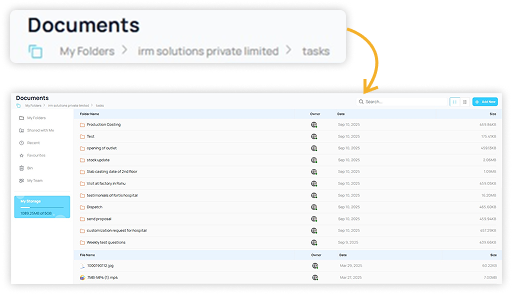
One of the biggest advantages of a unified system is visibility. IT managers need to know what is happening at any given time.
What Improves With a Central System
- All active requests are visible in one dashboard
- Tasks can be sorted by priority or status
- Teams can quickly identify pending or delayed issues
This helps in managing workload more effectively and ensures that no request is overlooked.
A task management app makes it easier to maintain this level of visibility without manual tracking.
Clear Task Ownership and Accountability
In IT support, assigning responsibility is critical. Without clear ownership, tasks can remain unresolved.
A structured system assigns each task to a specific team member. This creates accountability and reduces confusion.
How This Supports Teams
- No overlap in responsibilities
- Faster response to support requests
- Clear tracking of task completion
When responsibilities are defined clearly, teams can manage their workload more efficiently.
Faster Response and Resolution Times
Speed is important in IT support.
With a unified system, tasks are prioritized based on urgency. High-priority issues can be addressed first, while less critical tasks are scheduled accordingly.
Teams can also track deadlines for each task. This helps in maintaining consistent response times.
Using a task management app allows teams to respond quickly and reduce resolution delays.
Managing Recurring IT Tasks
IT help desks handle not only support requests but also routine tasks such as system checks, updates, and maintenance.
These recurring tasks are often overlooked when managed manually. A structured system allows teams to schedule and track these activities.
Examples of Recurring Tasks
- System monitoring
- Backup checks
- Software updates
- Security reviews
By managing these tasks within the same system, teams can ensure that routine work is completed on time.
Improving Team Coordination
IT support teams often work in shifts or across different locations. Coordination becomes important to ensure continuity.
A shared task system allows team members to see updates in real time. When one shift ends, the next team can pick up tasks without confusion.
Communication can also be linked directly to tasks. This keeps discussions relevant and avoids unnecessary follow-ups.
With a task management app, coordination becomes more structured and reliable.
Tracking Performance and Workload
Understanding team performance is important for improving service quality. Managers need to know how tasks are being handled.
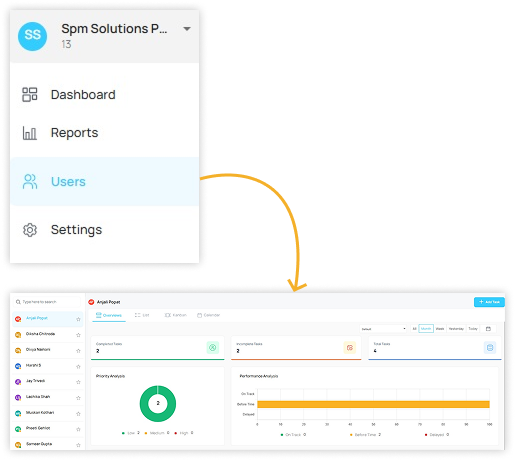
A unified system provides basic data on task completion, delays, and workload distribution. This helps in identifying areas where improvements are needed.
It also helps in balancing workload among team members. No one is overloaded, and tasks are distributed more evenly.
Reducing Errors and Missed Requests
When support requests are handled manually, there is always a risk of missing or duplicating tasks.
A central system reduces this risk by recording every request as a task. Teams can track progress and ensure that all issues are addressed.
This improves accuracy and builds consistency in service delivery.
A Practical Example from an IT Help Desk
Consider an IT support team managing requests for a mid-sized organisation.
Requests are converted into tasks and assigned to team members based on priority. Each task includes details such as issue type, deadline, and status.
As tasks are updated, managers can see overall progress. If a task is delayed, it is visible immediately, and action can be taken.
In this setup, a task management app helps the team stay organized and ensures that support requests are handled efficiently.
What to Look for in a Unified Task System
Selecting the right system depends on how well it supports daily help desk operations.
Key Factors to Consider
- Easy task creation and assignment
- Clear visibility of task status
- Support for priority-based tracking
- Ability to manage recurring tasks
- Simple collaboration features
Conclusion
IT help desks need a structured approach to manage support requests, routine tasks, and team coordination. Manual methods often create gaps that affect response times and service quality.
A unified system helps teams stay organized and ensures that all tasks are tracked and completed on time. Using a task management app allows IT teams to manage workflows more efficiently and maintain better control over operations.
For organisations looking to improve help desk efficiency in a practical way, TaskOPad Solutions Private Limited provides a solution that supports clear task tracking and smooth team coordination.