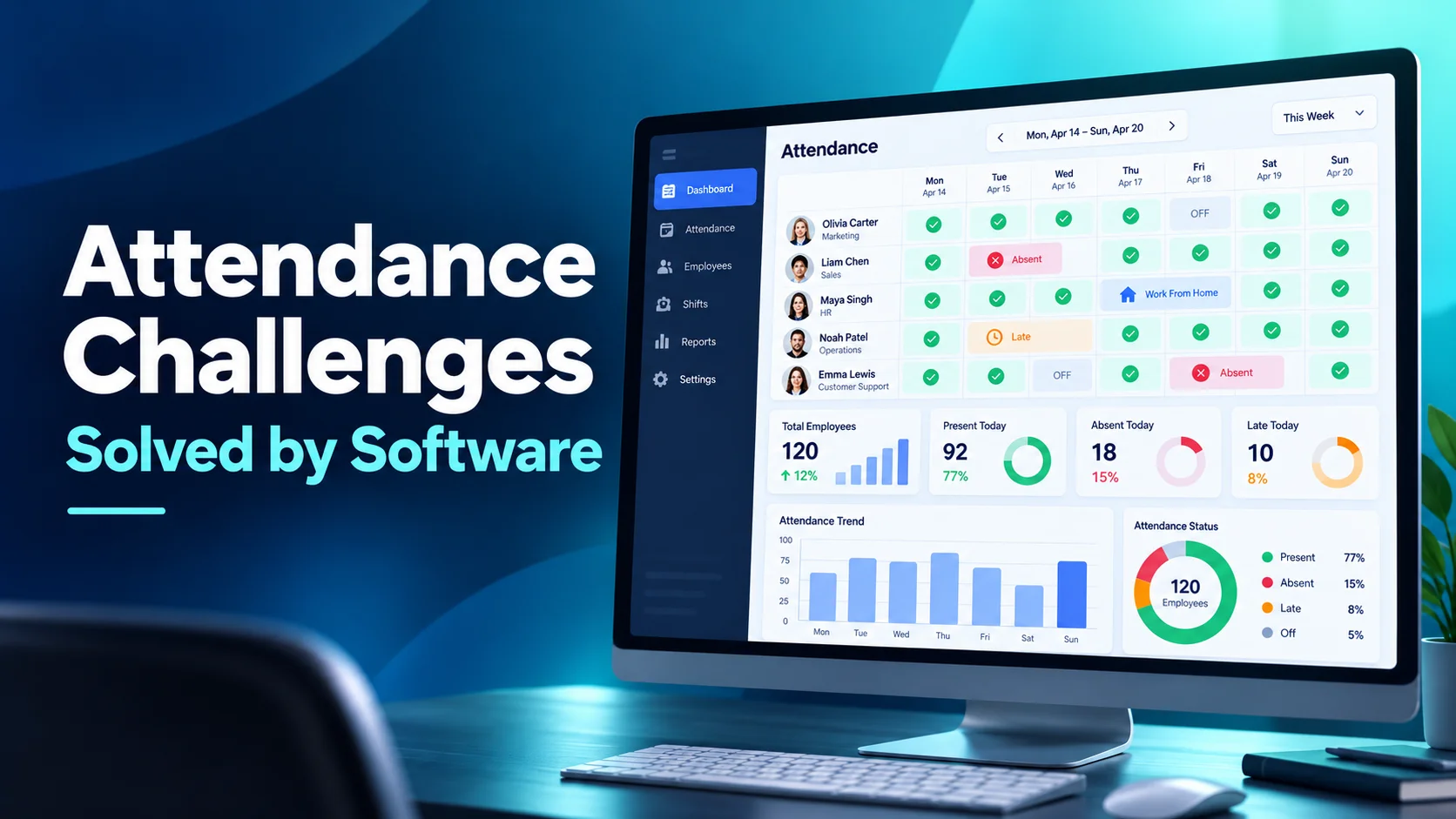
 Sign up with Google
 Sign in with Zoho

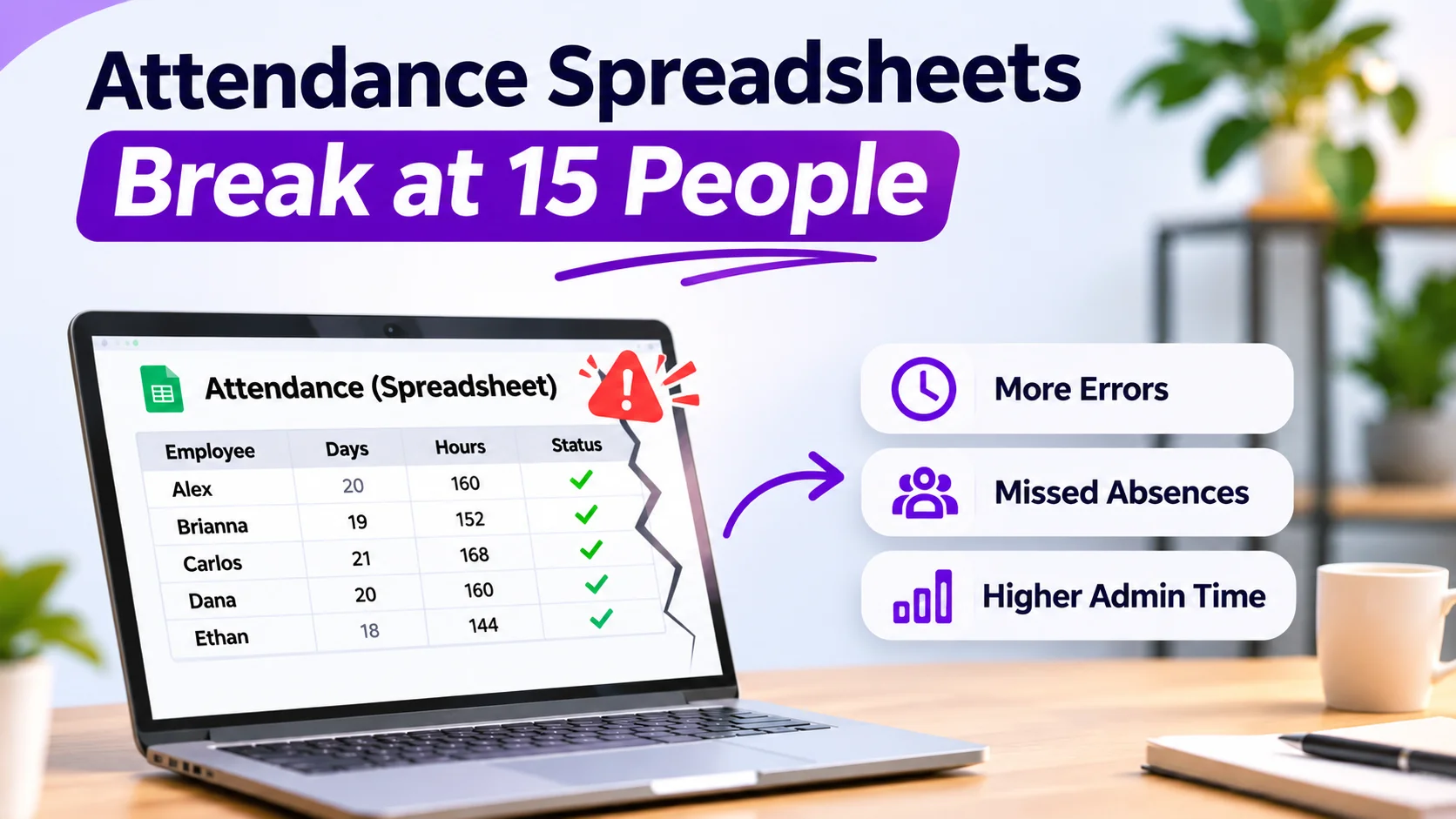
Attendance spreadsheets work well for very small teams, but they usually start to break somewhere around 15 employees. At that size, a business typically has more than one manager editing the file, overlapping leave requests, different shifts or work locations, and payroll that depends on the sheet being right. Errors creep in, corrections pile up, and the spreadsheet stops being a record anyone trusts. The next step for most growing teams is employee attendance tracking software that records check-ins, breaks, and leave automatically.
Fifteen is not a magic number. Some teams hit the wall at 10, others hold out until 25. But the pattern is consistent, and knowing what comes next helps you switch before a payroll error or compliance problem forces the decision.
Key Takeaways
- Spreadsheets fail from complexity, not headcount alone: more editors, schedules, and leave types.
- The breakdown follows a predictable path, from version confusion to payroll errors to compliance risk.
- The biggest hidden cost is manager time spent fixing and reconciling attendance data.
- Moving to attendance software can be done in about two weeks with a short pilot.
- Good attendance systems log time automatically and keep an approval trail for every correction.
Why Do Attendance Spreadsheets Work at First?
With five or six people, one owner or office manager knows who is in, who is out, and who left early. The spreadsheet is a simple log: names down the side, dates across the top, and a few codes for present, absent, or on leave.
It is free, familiar, and flexible. For a small team with one location and one schedule, it is often the right tool.
Why Do Attendance Spreadsheets Break Around 15 People?
Growth adds complexity faster than it adds people. Around 15 employees, several things usually happen at once:
- More than one person edits the file. Two or three managers update attendance, each with their own habits.
- Schedules diverge. Part-time staff, shifts, flexible hours, and remote workers no longer fit one simple grid.
- Leave overlaps. Vacation, sick days, and unpaid leave need balances, approvals, and coverage planning.
- Payroll depends on it. Hours, overtime, and deductions now flow from the sheet to payroll every cycle.
- Nobody owns it full time. Attendance becomes a side task for busy managers.
Each of these is manageable alone. Together, they turn a simple log into a fragile system held together by formulas and memory.
What Happens Next? The Five Stages of Spreadsheet Breakdown
Stage 1: Version Confusion
Copies multiply. One manager works from a downloaded file, another from the shared version, and a third from last month's template. Nobody is sure which file is current.
Stage 2: Manual Corrections
Missed check-ins, late arrivals, and forgotten leave entries get fixed by hand, often days later. There is no record of who changed what or why.
Stage 3: Payroll Errors and Disputes
A broken formula, a wrong leave code, or a missed overtime entry reaches payroll. Employees notice short paychecks quickly, and every dispute takes time to investigate because the history is unclear.
Stage 4: Compliance Exposure
In the United States, the Fair Labor Standards Act (FLSA) requires employers to keep accurate records of hours worked by non-exempt employees. Under 29 CFR Part 516, payroll records must be kept for three years and time cards for two. Many states add their own rules on breaks, overtime, and paid leave. A spreadsheet with untracked edits makes those records hard to defend.
Stage 5: The Manager Time Drain
Managers spend hours each week chasing missing entries, reconciling leave, and answering "why was I marked absent?" That time comes straight out of the work they were hired to do.
What Does a Broken Attendance Spreadsheet Really Cost?
The software is free. The time is not. Here is a simple way to estimate your own cost, using example numbers you can replace with yours:
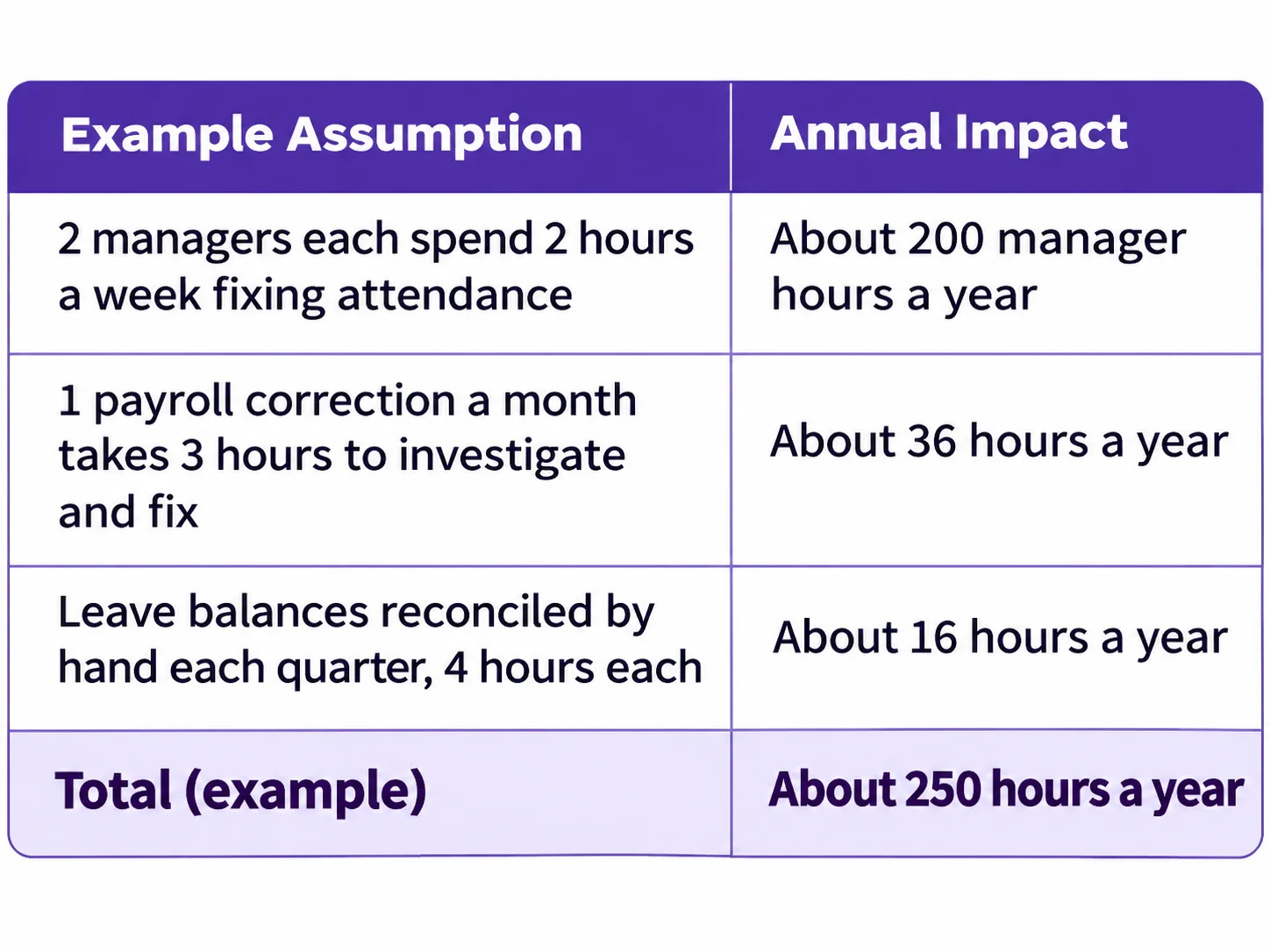
Multiply your own total by a loaded hourly cost for those managers, and the "free" spreadsheet often turns out to be the most expensive option.
What Are the Warning Signs You Have Outgrown Your Spreadsheet?
- More than one person edits attendance each week.
- You have had a payroll correction caused by attendance data in the last quarter.
- Leave balances are tracked in a second file, or in someone's head.
- Remote or hybrid staff check in by message or email.
- You could not easily show who changed a record, and when, if asked.
If three or more apply, the spreadsheet is already costing you more than it saves.
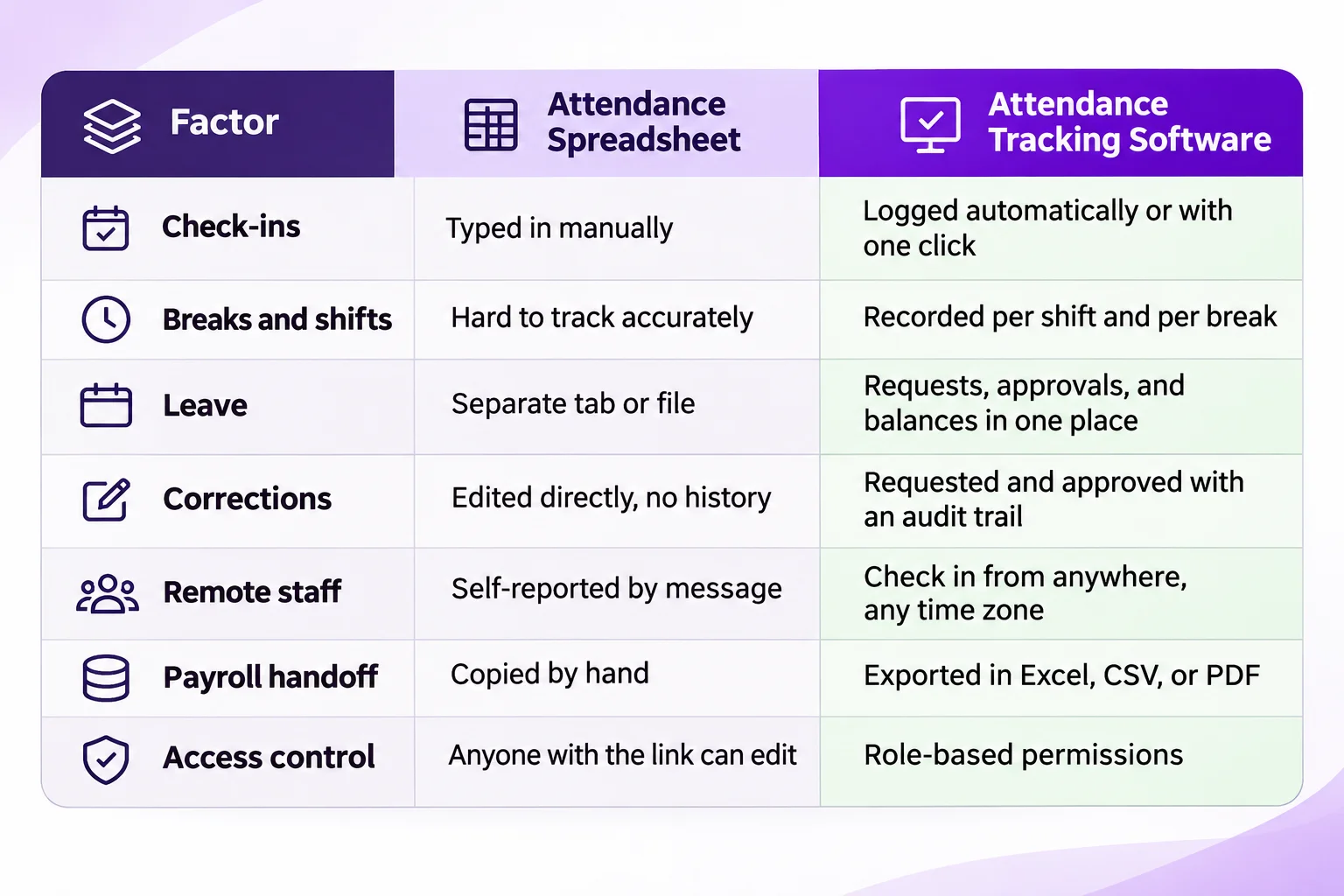
Spreadsheet vs Attendance Tracking Software
How Do You Move From Spreadsheets to Attendance Software?
A clean switch takes about two weeks. Rushing it creates the same mess in a new tool.
Step 1: Write Down Your Rules (Days 1 to 2)
Document work hours, grace periods for late arrivals, break rules, leave types, and who approves what. Many teams discover their rules were never written down.
Step 2: Clean Up Your Data (Days 3 to 4)
Confirm the employee list, managers, schedules, and current leave balances. Close out the spreadsheet on a clear cutoff date.
Step 3: Configure the System (Days 5 to 6)
Set up shifts, time zones, leave policies, and approval chains. Look for employee attendance tracking software that logs check-ins, breaks, and shifts automatically, so managers review data instead of entering it.
Step 4: Pilot With One Team (Days 7 to 11)
Run one team on the new system for a week. Collect questions and fix confusing settings before everyone joins.
Step 5: Roll Out and Retire the Spreadsheet (Days 12 to 14)
Launch to everyone, keep the old spreadsheet as a read-only archive for your required retention period, and stop all edits to it.
What Should You Look for in Attendance Tracking Software?
- Automatic check-in and breaks. Less manual entry means fewer errors.
- Shift and schedule support. Essential once teams work different hours.
- Built-in leave. A leave management feature keeps requests, approvals, and balances next to attendance, instead of in a separate file.
- Corrections with approval. Employees can request a fix, and managers approve it, leaving a clear record.
- Time zone handling. Critical for remote, hybrid, and offshore teams.
- Exports and reports. Clean files for payroll and simple reports on lateness, absence, and overtime.
- Permissions and security. Employees see their own records, managers see their teams, and data is encrypted.
How Do You Handle Privacy and Employee Trust?
Attendance tracking is about recording when people work, not watching how they work. Tell employees what is collected, why, and who can see it. Put it in a short written policy. If you employ staff in the EU or UK, review your GDPR obligations before collecting any attendance or activity data.
Best Practices for Growing Teams
- Switch before a crisis. Change systems on your timeline, not after a payroll dispute.
- Keep policies simple. Fewer leave types and clear grace periods reduce exceptions.
- Make one person the owner. Operations or HR should own the system and its rules.
- Review monthly. Check lateness, absence, and correction trends, not just individual records.
Common Mistakes When Leaving Spreadsheets Behind
- Running both systems in parallel for months. Two sources of truth is worse than one imperfect one.
- Skipping the rules step. Software enforces policies. It cannot invent them.
- Deleting the old spreadsheet. Keep it as a read-only archive for your retention period.
- Not explaining the change. Without context, staff may assume they are being monitored more closely.
The Bottom Line
Attendance spreadsheets do not fail on a specific day. They fail slowly, one manual fix at a time, until payroll errors and lost manager hours make the cost obvious. If your team is near 15 people, or already past it, write down your rules, run a short pilot, and move attendance into a system built for it before the spreadsheet makes the decision for you. The Bottom Line
Frequently Asked Questions
When should a business stop using attendance spreadsheets?
When more than one person edits attendance, schedules or leave become complex, or attendance errors start reaching payroll. For many teams, that happens around 10 to 20 employees.
Why do attendance spreadsheets cause payroll errors?
Manual entry, broken formulas, missed leave codes, and untracked edits all flow straight into payroll calculations.
Is attendance tracking software worth it for small businesses?
Often, yes. The time managers save on fixing and reconciling attendance usually outweighs the cost once a team passes about 15 people.
How long does it take to switch from spreadsheets to attendance software?
About two weeks: a few days to set rules and clean data, a few days to configure, a one-week pilot, and a final rollout.
How long should employers keep attendance records?
Under the FLSA, US employers must keep payroll records for three years and time cards for two years. State and international rules may require longer.
Can attendance software track remote employees?
Yes. Most tools let remote and hybrid staff check in from anywhere and handle multiple time zones.
Does attendance tracking mean monitoring employees?
Not necessarily. Attendance tracking records when people start, stop, and take breaks. Be clear in writing about what is and is not collected.