Sign up with Google
 Sign in with Zoho
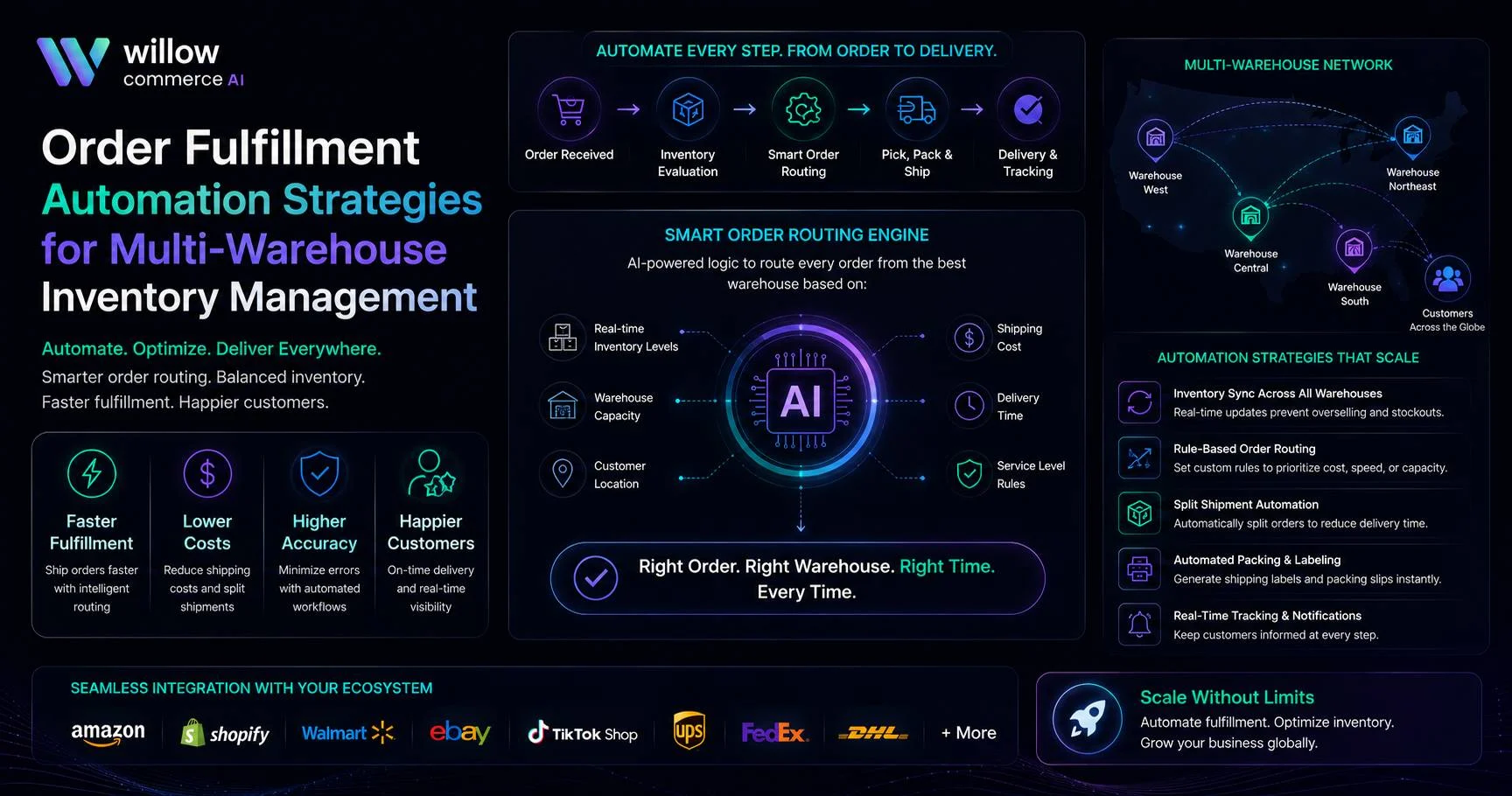
What happens when Dallas has two items, Reno has the third, and the customer expects one package by Friday? A distance rule will not settle that properly. Order fulfillment automation helps the business weigh stock, labor, carrier cost, cutoff time, and the delivery promise before the order reaches a pick queue.
Most breakdowns begin with small gaps. One marketplace still shows stock after another channel has reserved it. A picker receives an order five minutes after the final collection. Another order split because the system checked product availability but ignored parcel cost. Each mistake looks manageable. Repeated across several sites, it becomes expensive.
The network needs one order record and one inventory position. Warehouses may have different layouts or staffing patterns. Their decisions, though, should follow the same commercial rules. A connected fulfillment workflow automation process can apply those rules across every location.
Build Routing Rules Around the Full Cost of Shipping
The closest warehouse can still be the wrong choice. It may have only part of the basket, a crowded packing line, or poor rates for the required service. Another location may be farther away, yet ship the full order for less.
Order fulfillment automation should compare available stock, open workload, carrier rate, promised date, package profile, cutoff time, and the cost of a split. The system then assigns the order based on the total outcome. Mileage becomes one input, not the decision.
Willow Commerce uses AI-based routing to assess inventory, proximity, shipping cost, and delivery speed. That approach suits a network where the best location can change from one order to the next.
Stock protection also belongs in the routing policy. A retailer may reserve popular products for buyers near a regional warehouse. It may direct older units from another facility first. During a backlog, the system may stop sending fresh orders to one site for an hour. Rules like these should remain adjustable because demand rarely follows the same pattern every week. Effective fulfillment workflow automation lets operators adjust these controls without rebuilding the entire process.
Tie Inventory Changes to Actual Order Events
Inventory accuracy often fails because an update arrives too late. If the quantity changes only after shipment, other channels can keep selling units that already belong to open orders.
Fulfillment workflow automation should reserve inventory when the system assigns a warehouse. It should send that revised number to connected channels at once. Picking, packing, and shipping can create later updates, but the available-to-sell figure needs to change at allocation.
On receipt of an order, the system must verify the address, payment & channel rules to ensure that it does not release a poor order. Upon allotting the stock, it should reserve the stock in the selected site so that overselling can be minimized. Pick release should contain item and bin instructions, reducing manual handoffs. The rate, service, and cutoff to control parcel cost should be compared when selecting a carrier. Once confirmed to ship, the system should provide tracking information to channels and buyers to ensure all orders are in sync.
Order fulfillment automation performs better when the inventory ledger, warehouse queue, and marketplace status respond to the same event sequence. Several connected tools can still produce bad data when one updates now and another updates ten minutes later. Reliable fulfillment workflow automation keeps these updates tied to the same order events.
Pull Exceptions Out Before Packing Begins
Most orders should pass through without staff review. Some should stop. An incomplete address, missing dimensions, unusual weight, payment hold, or carrier restriction needs attention before label creation.
A useful exception process should:
- Block labels when required product data is missing
- Flag addresses without apartment or unit details
- Compare the expected weight with the packed weight
- Reassign orders after a missed carrier cutoff
- Apply signature or insurance rules to high-value shipments
- Warn staff when a split exceeds the approved cost
Willow Commerce supports rule-based holds, carrier assignment, warehouse allocation, and issue checks before labels print. That gives the team time to fix the order while it is still inside the operation.
The business should use fulfillment workflow automation to place each stopped order in a visible queue. The queue needs a reason, an owner, and a next step. Otherwise, automation only moves the manual search from a spreadsheet to a dashboard.
Treat Split Orders and Batch Work as Cost Decisions
A split shipment may save the promised date. It also adds another box, label, pick task, and tracking message. The system should compare that added expense with the service risk of waiting for a complete order.
Order fulfillment automation can merge orders from the same buyer when they arrive within a set period. That rule needs boundaries. Combining parcels should not delay an urgent shipment or push the carton into a more expensive carrier bracket.
Batch work needs similar care. Grouping by carrier, warehouse zone, service level, or SKU family can shorten walking time. Oversized batches can hide replacement orders and marketplace deadlines, so priority releases must remain separate. Well-configured fulfillment workflow automation can keep urgent orders outside standard batches.
Conclusion: Use One Decision Model Across Every Site
Multi-warehouse inventory becomes easier to control when routing, allocation, carrier choice, exceptions, and channel updates follow one decision model. The software should remove repeated checks rather than create another place for staff to compare numbers.
A consulting review should trace current order paths, warehouse cutoffs, manual approvals, split rules, and update timing. That work creates a more reliable base for order fulfillment automation.