Sign up with Google
 Sign in with Zoho


Technology is changing the way teachers teach and students learn. Classrooms that once depended mainly on chalkboards, textbooks, and printed notes are now becoming more digital, connected, and interactive. Teachers can use videos, presentations, digital resources, online applications, diagrams, and interactive activities to make lessons easier to understand.
But simply adding technology to a classroom does not automatically make it a smart classroom. The technology should help teachers explain concepts clearly, encourage students to participate, and make learning more engaging.
This is where interactive flat panel displays have an important role to play.
An interactive flat panel combines a display, touchscreen, digital whiteboard, and computing capabilities in one device. Instead of only showing information, it allows teachers and students to interact directly with the content. They can write, draw, annotate, open applications, display videos, browse digital resources, share content, and work together on the same screen.
Logic AV offers interactive display solutions designed for schools, colleges, universities, coaching centres, and training environments. Its range includes features such as 4K Ultra HD displays, wireless multi-device sharing, Google EDLA certification, device management, built-in smart tools, and AI-powered capabilities on selected models.
As smart classroom technology continues to develop, interactive flat panels are becoming more than just digital boards. They can act as the central technology platform of a modern classroom.
What Is an Interactive Flat Panel Display?
An interactive flat panel display is a large touchscreen designed for teaching, presentations, collaboration, and digital interaction.
Think of it as a combination of a traditional whiteboard, television or monitor, touchscreen, and computer. Teachers can use it to write notes, explain diagrams, show presentations, play videos, access online resources, and interact with educational applications.
Students can also participate directly. A teacher can ask a student to solve a problem on the screen, label a diagram, highlight an answer, or present a project.
This makes an interactive panel different from a standard display. A normal screen is mainly used for viewing, while an interactive panel is designed for viewing and doing.
Logic AV describes its interactive flat panels as all-in-one solutions that bring together a whiteboard, touchscreen, and computer, with features designed to support more collaborative and engaging learning.
Why Are Interactive Flat Panels Important in Smart Classrooms?
A smart classroom is not simply a classroom with a large screen. It is an environment where digital technology supports teaching, communication, collaboration, and learning.
An interactive panel can become the main point where these activities happen.
For example, a teacher may begin a lesson with a presentation, switch to a digital whiteboard to explain a concept, play a video, annotate an image, open an educational application, and then ask students to participate in an activity. All of these activities can happen through the same classroom display.
This reduces the need to move between multiple pieces of equipment and gives teachers more flexibility during lessons.
Logic AV's education solutions are designed for different learning environments, including K-12 schools, colleges and universities, and coaching or training centres.
Let's look at the major ways interactive flat panels contribute to smart classroom technology.
1. Makes Teaching More Interactive
The biggest advantage of an interactive panel is the ability to turn a lesson into an interactive experience.
Traditional teaching can sometimes be one-directional. The teacher explains a topic while students listen and take notes. With an interactive panel, students can become part of the lesson.
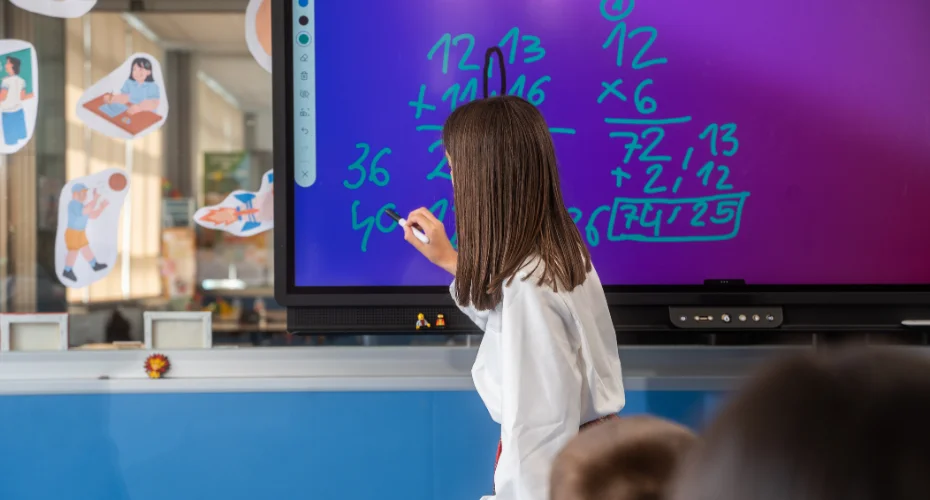
For example, a mathematics teacher can display an equation and ask a student to solve it directly on the screen. A science teacher can show a diagram and ask students to identify different parts. A geography teacher can display a map and allow students to locate different countries or regions.
This type of interaction can make lessons more engaging.
Modern classroom interactive displays can also support multi-touch activities, allowing more than one person to interact with content where the selected model supports it.
Logic AV's range includes panels designed around interactive teaching, with multi-touch capabilities, annotation tools, digital whiteboarding, and other classroom functions.
The purpose is not to use technology simply because it is available. The purpose is to give teachers another practical way to involve students.
2. Improves Visual Learning
Some concepts are difficult to explain with words alone.
Students may understand a topic more easily when they can see a diagram, animation, video, image, graph, or map.
This is where educational interactive displays can be particularly useful.
A teacher can display a detailed image, zoom into specific areas, write notes over it, highlight important information, and explain the topic step by step.
For example, a biology teacher explaining the human heart can display a detailed diagram and label different chambers directly on the screen. A physics teacher can show an animation of motion. A geography teacher can zoom into a map to explain geographical features.
Logic AV's interactive displays include 4K Ultra HD models designed to provide clear visuals for text, videos, diagrams, and other content.
Clear visuals are especially important in larger classrooms where students need to see small text and detailed images from a distance.
3. Encourages Student Collaboration
Modern education is increasingly focused on collaboration.
Students are often asked to work in groups, solve problems together, discuss ideas, and present their findings. Interactive technology can support this approach by providing a shared digital workspace.
For example, several students can work on a project and then present their results on the interactive panel. A teacher can compare different answers on the same screen and encourage the class to discuss them.
Wireless screen sharing can make this process easier.
Logic AV highlights wireless multi-device sharing as a key feature of its interactive display solutions, with supported models able to share content from up to nine devices simultaneously.
This can be useful for group assignments, presentations, classroom discussions, and collaborative problem-solving.
Instead of the display being something students simply look at, it becomes a shared workspace where everyone can contribute.
4. Combines Multiple Classroom Tools
A teacher may need several tools during a single lesson.
They might need a digital whiteboard, presentation, browser, video, image, PDF, educational application, or online resource.
Using separate equipment for each task can interrupt the flow of teaching.
Interactive panels can bring many of these functions together.
A teacher can move between digital content, whiteboarding, applications, and presentations without changing the main display.
Logic AV's interactive display solutions include built-in smart tools, Android functionality, digital whiteboarding, wireless sharing, and other features designed to simplify classroom technology. Selected models also provide Google services through Google EDLA certification.
This all-in-one approach can make technology easier for teachers to use.
5. Supports Digital Whiteboarding
The digital whiteboard is one of the most practical features of an interactive panel.
Teachers can write directly on the display using their fingers or a compatible stylus. They can draw diagrams, underline important points, erase information, move objects, and save their work.
This combines the familiarity of a traditional whiteboard with the flexibility of digital technology.
For example, a teacher can prepare a lesson before class and then add notes during the discussion. The completed work can potentially be saved for future reference, depending on the software and workflow being used.
Logic AV's HX Series includes the Note Pro application for digital whiteboarding and supports multi-touch interaction. Its product range also includes models with advanced touch and writing capabilities.
This makes digital whiteboarding useful for subjects that require regular writing, drawing, calculations, or annotations.
6. Makes Multimedia Teaching Easier
Today's students are exposed to different types of digital content every day.
Teachers can use this familiarity to make classroom lessons more visual and engaging.
With interactive screens for classrooms, educators can combine text with videos, images, presentations, animations, websites, and other digital material.
For example, a language teacher can play an audio or video clip and then discuss it with the class. A history teacher can display historical photographs and documents. A science teacher can use animations to explain processes that are difficult to demonstrate physically.
The ability to switch between different types of content from one display can help teachers maintain the flow of a lesson.
Logic AV's solutions are designed to support schools, colleges, and coaching centres with interactive teaching tools, content access, and quick content switching.
7. Supports AI-Powered Learning
Artificial intelligence is becoming an important part of modern classroom technology.
AI can help educators with lesson preparation, content discovery, assessments, idea organization, and interactive learning activities.
Logic AV's NeoAI-powered interactive displays include features designed to support educators with lesson planning, content discovery, and intelligent classroom tools.
Some of Logic AV's newer models offer more advanced AI features. The CX Series, for example, includes AI-powered tools such as live subtitles, AI-assisted assessments, smart mapping, AI topics, and interactive content tools.
The ZX Series also includes tools such as Smart Test Builder, live subtitles, AI-powered mapping, and content-related AI functions.
These features can help teachers create more interactive lessons and assessments.
However, AI should be treated as a support tool. The teacher remains at the centre of the learning process, deciding which information, activities, and tools are appropriate for students.
8. Supports Different Learning Environments
Every educational institution has different requirements.
A primary school may need simple interactive lessons and annotation tools. A college may require wireless sharing and split-screen multitasking. A coaching centre may need fast content switching and reliable performance throughout the day.
This is why smart classroom technology needs to be flexible.
Logic AV offers different interactive display series, including CX Pro, CX, ZX, HX, and AZ, with different combinations of features and capabilities.
The company specifically positions its solutions for schools, colleges and universities, and coaching and training centres.
This allows institutions to choose a solution according to their classroom size, teaching methods, content requirements, collaboration needs, and technology environment.
9. Makes Multitasking Easier
Teachers frequently need to use more than one resource at the same time.
They might want to display a presentation while writing notes, compare two documents, browse information while keeping a whiteboard open, or show a video while referring to another application.
Split-screen functionality can make these tasks easier.
For example, Logic AV's HX Series provides split-screen multitasking, while the ZX and CX Series include dual-view capabilities on supported configurations.
This can help teachers work more efficiently without repeatedly switching between applications.
In a classroom environment, even small improvements in workflow can make a lesson smoother.
10. Creates a More Connected Classroom
A smart classroom often involves multiple devices.
Teachers may use laptops, students may use tablets or smartphones, and institutions may have other connected equipment.
An interactive panel can act as a central point for bringing this content together.
Wireless sharing allows teachers and students to present content without relying entirely on cables. Logic AV states that supported interactive displays can connect and share content from up to nine devices, including Windows, macOS, Android, and iOS devices on compatible models.
This makes the classroom more flexible.
Students can present their work, teachers can share lesson material, and groups can contribute content during collaborative activities.
Interactive Flat Panels Beyond the Classroom
Although education is one of the main applications, interactive display technology can also be useful in other environments.
For example, an interactive wall display can be used in training rooms, presentation areas, collaboration spaces, and institutional meeting areas.
The same technology can also be useful as an interactive display for conference room applications. In a conference room, an interactive panel can support presentations, brainstorming, document annotation, video collaboration, and group discussions.
Logic AV's interactive display portfolio is designed not only for classrooms but also for learning and meeting environments. Its product page highlights wireless sharing for classrooms and meeting spaces, while the AZ Series is positioned for smart classrooms and workspaces.
This versatility can make interactive displays useful across an educational institution.
For example, a university could use interactive panels in classrooms, lecture halls, seminar rooms, training areas, and meeting spaces.
Interactive Displays for Education: What Makes Them Useful?
The growing adoption of interactive displays for education is connected to a simple idea: technology should make teaching easier and learning more engaging.
An interactive panel can support several activities within one lesson:
- Digital whiteboarding
- Presentations
- Video-based learning
- Image and diagram explanation
- Online research
- Student presentations
- Group collaboration
- Digital annotation
- Interactive assessments
- Wireless screen sharing
- AI-supported learning activities
The benefit comes from bringing these functions together.
Instead of using one device for presentation, another for whiteboarding, and another for collaboration, teachers can perform many tasks from a single interactive platform.
How to Choose the Right Interactive Display for a Smart Classroom
Choosing the right display requires more than looking at screen size or price.
Schools should consider how the panel will actually be used.
1. Consider the Classroom Size
A larger classroom may require a larger screen so that students sitting at the back can clearly see content.
2. Check Display Quality
4K Ultra HD resolution can be useful for detailed diagrams, text, presentations, images, and videos. Logic AV offers 4K displays across its interactive display range.
3. Look at Touch Performance
Touch accuracy and responsiveness are important because teachers may write and draw directly on the screen.
Some Logic AV models provide advanced multi-touch capabilities. For example, the HX Series supports up to 40 touch points and 20 writing points.
4. Check Wireless Connectivity
If the classroom encourages collaboration, wireless screen sharing can be highly useful.
Logic AV's supported models allow multiple devices to share content wirelessly, with some models supporting up to nine devices simultaneously.
5. Consider Software Compatibility
Before purchasing, schools should check whether the panel works with the software and applications teachers already use.
Logic AV's interactive digital boards support Android and can also be paired with Windows through an optional OPS module, providing additional flexibility for institutions that depend on Windows applications.
6. Look at Device Management
Managing one classroom display is relatively simple. Managing dozens of displays across a school or university is different.
A centralized Device Management System can help institutions monitor and manage multiple displays from one location. Logic AV includes device management capabilities in its interactive display solutions.
7. Consider AI Features
AI tools can be valuable for lesson planning, assessments, content discovery, and classroom activities.
However, institutions should focus on useful features rather than selecting a display simply because it has AI.
Why Choose Logic AV for Smart Classroom Technology?
Logic AV focuses on AV and interactive technology solutions and offers a range of interactive panels for India's education ecosystem.
Its interactive display page covers solutions for K-12 schools, colleges and universities, and coaching and training centres.
The range includes different models and series with features such as:
- 4K Ultra HD display
- Google EDLA certification on supported models
- Wireless multi-device sharing
- Digital whiteboarding
- Device Management System
- Multi-touch interaction
- Android functionality
- Split-screen multitasking
- AI-powered tools on selected models
Logic AV's CX Series, for example, combines 4K display technology, Google EDLA certification, wireless screen sharing, AI features, and device management.
Its HX Series provides 4K resolution, Android 14, Google Play services, multi-touch functionality, wireless sharing, digital whiteboarding, and split-screen multitasking.
The AX Series focuses on immersive classroom interaction, precision writing, wireless screen sharing, and cloud-based teaching and storage capabilities.
The important point is that institutions should select the model that fits their actual teaching requirements rather than choosing technology based only on specifications.
The Future of Smart Classrooms
Smart classroom technology will continue to evolve.
AI, cloud-based learning, connected devices, online collaboration, digital content, and hybrid learning are likely to become increasingly important.
Interactive panels can provide a foundation for these developments because they combine display, touch interaction, connectivity, and computing capabilities in one platform.
Future classrooms may use interactive displays not only for teaching but also for collaborative projects, remote participation, AI-assisted learning, digital assessments, presentations, and institutional communication.
The technology will continue to change, but the basic objective will remain the same: help teachers teach more effectively and help students learn more actively.
Interactive flat panel displays are becoming an important part of modern smart classroom technology.
They provide more than a large screen. They give teachers a digital workspace where they can write, present, demonstrate, collaborate, access multimedia content, and use smart classroom tools.
For students, they can create a more visual and participatory learning experience.
From classroom interactive displays and educational interactive displays to interactive screens for classrooms, these technologies can support different teaching styles and educational environments.
The same technology can also extend beyond classrooms. An interactive wall display can support training and collaboration, while an interactive display for conference room use can improve presentations, brainstorming, and meetings.
Most importantly, interactive displays for education should be selected based on real teaching needs. Screen size, display quality, touch performance, connectivity, software compatibility, wireless sharing, AI capabilities, and device management should all be considered.
Logic AV offers a range of interactive display solutions designed to support schools, colleges, universities, coaching centres, and other learning environments. With features such as 4K displays, wireless multi-device sharing, Google EDLA certification, digital whiteboarding, AI-powered tools, and centralized device management on supported solutions, Logic AV provides options for institutions looking to build more connected and interactive learning spaces.
Ultimately, the success of a smart classroom is not determined by technology alone. It depends on how effectively teachers use that technology to explain ideas, encourage participation, support collaboration, and create meaningful learning experiences.
The right interactive flat panel can become an important part of that journey.
Frequently Asked Questions
1. What is an interactive flat panel display used for in a classroom?
An interactive flat panel display is used for digital teaching, presentations, whiteboarding, multimedia lessons, student activities, annotation, collaboration, and interactive learning. Teachers can use the touchscreen to write or interact with content, while students can participate in activities directly on the display.
2. How are interactive flat panels different from traditional projectors?
An interactive flat panel combines a touchscreen, digital whiteboard, display, and computing capabilities in one device. Unlike a projector-based setup, it allows users to interact directly with the screen and generally provides brighter, high-resolution visuals with fewer separate components to manage. Logic AV specifically describes its interactive flat panels as combining touchscreen, whiteboard, and computing functions.
3. Are interactive displays suitable for all types of educational institutions?
Yes. Interactive displays can be used in K-12 schools, colleges, universities, coaching centres, training rooms, seminar spaces, and other educational environments. The appropriate model depends on classroom size, teaching requirements, software needs, collaboration requirements, and expected usage. Logic AV offers different interactive display series for these varied environments.
4. Can students share their screens on a Logic AV interactive display?
Yes. Supported Logic AV interactive displays provide wireless screen-sharing capabilities. Depending on the model, users can share content from up to nine devices simultaneously, with compatibility across platforms such as Windows, macOS, Android, and iOS.
5. What should schools consider before buying an interactive flat panel?
Schools should consider screen size, resolution, touch responsiveness, multi-touch support, wireless sharing, operating system, software compatibility, AI features, built-in audio, device management, connectivity, and long-term support. It is important to choose a model based on the actual classroom environment and teaching requirements rather than focusing only on the number of features.