Sign up with Google
 Sign in with Zoho

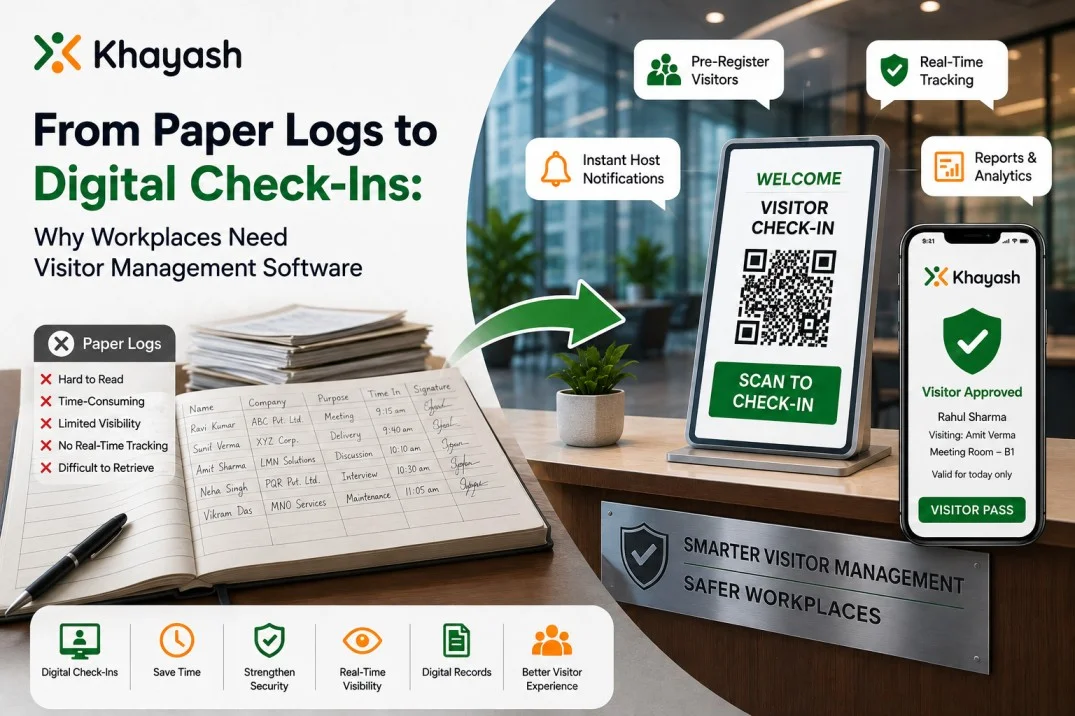
Walk into an office building and there is a good chance you will still find a reception desk with a visitor register sitting on it.
A guest arrives, writes down their name, company, phone number, whom they are meeting, and the time of arrival. Someone at the reception desk checks the details, calls the employee, and eventually allows the visitor to enter.
It works.
At least, it works until the number of visitors increases.
Then the problems start to become obvious.
Handwritten information can be difficult to read. Reception teams have to spend time entering and checking details. Employees may not know that their visitor has arrived. Finding an old visitor record can take time. And during an emergency, a paper register isn't exactly the easiest way to find out who is currently inside the building.
This is where visitor management software can make a practical difference.
Instead of treating visitor registration as a simple sign-in process, digital systems bring registration, notifications, visitor tracking, approvals, and access management into one workflow.
The Problem With Paper Visitor Registers
Paper registers aren't necessarily bad because they're old-fashioned. They're problematic because they provide very little visibility.
Imagine a company receiving 100 visitors throughout a busy day.
The receptionist has to manage arrivals while answering calls, responding to employees, receiving deliveries, and handling other front-desk responsibilities.
Now imagine trying to answer questions such as:
- Who is currently inside the building?
- Which visitors haven't checked out?
- Who was expected today?
- Has a particular visitor arrived?
- Which employee is hosting the visitor?
- Who visited the office last Tuesday?
- Were all visitors accounted for during an emergency?
With a paper register, answering these questions can involve manually going through several pages.
A digital system can make this information much easier to access.
What Changes With Digital Check-Ins?
Digital check-in doesn't simply mean replacing a pen with a tablet.
The bigger change is what happens around the check-in.
A visitor can be invited before arriving, complete registration digitally, scan a QR code, receive a badge, and trigger a notification to the host.
The process can also record when the visitor enters and leaves.
For example:
Visitor arrives → Check-in → Host notified → Visitor approved → Badge issued → Visit recorded → Check-out
Instead of several disconnected tasks, the organization gets one traceable process.
That can make the experience easier for the visitor and less demanding for the reception team.
Pre-Registration Can Reduce Waiting
Not every visitor should have to start the registration process from scratch at the reception desk.
Consider an interview candidate arriving at 10:00 AM.
The company already knows the person's name, the employee they're meeting, and the appointment time.
With pre-registration, some of the information can be prepared before the visitor arrives.
The guest can receive an invitation and complete the required steps in advance.
When they arrive, the check-in process can be much quicker.
The same idea can work for vendors, contractors, clients, interview candidates, and regular business visitors.
QR Check-In Makes the Process Faster
QR codes have become a familiar part of everyday digital experiences.
They can also be useful at the workplace reception.
A visitor can scan a QR code to begin the check-in process rather than filling out a paper form.
This can be particularly useful when several visitors arrive around the same time.
A faster check-in doesn't just benefit visitors. It also gives reception staff more time to deal with other responsibilities instead of repeatedly entering the same information manually.
Employees Can Know When Their Visitors Arrive
One of the simplest improvements a digital visitor system can make is automatic host notification.
Without a digital system, a receptionist may need to call or message an employee whenever someone arrives.
That becomes tedious when the reception desk is busy.
With automated notifications, the host can be informed when their visitor checks in.
The employee can then come to reception or respond according to the organization's visitor process.
It removes one small but repetitive task from the front desk.
Security Becomes More Than a Name in a Register
A visitor register records information.
A visitor management system can help organizations act on that information.
For example, a system can support visitor approval workflows, access permissions, visitor history, and watchlists.
If an organization needs a particular visitor to be approved before entering, the host can review the request rather than allowing unrestricted access.
Some systems can also alert staff when a person on a watchlist attempts to enter.
These capabilities don't replace security personnel or an organization's security policies. They provide another layer of visibility and control.
Knowing Who Is Inside Matters During Emergencies
This is one of the strongest reasons to move away from paper-based visitor records.
During an emergency, organizations need to know who is on the premises.
Employees may already be tracked through separate systems, but visitors, contractors, vendors, and interview candidates can be harder to account for.
A digital visitor system can provide a current view of visitors who have checked in and have not yet checked out.
That information can be useful to security and facility teams when they need to account for people inside the building.
Visitor History Becomes Easier to Find
Imagine someone asking:
"Did this person visit our office last month?"
With a paper register, somebody may have to search through old pages.
With digital records, visitor information can be searched, filtered, and reviewed much more easily.
Depending on the system and its configuration, organizations can maintain records such as visitor names, visit dates, hosts, purpose of visit, check-in time, and check-out time.
This can also make reporting easier for facility and security teams.
Digital Badges Give Visitors a Clear Identity
A visitor badge serves a simple purpose: it tells people that someone is a guest and, depending on the setup, may show relevant information about the visit.
Digital visitor systems can generate customized badges as part of the check-in workflow.
For a large office, this can make it easier for employees and security teams to distinguish visitors from employees.
It also gives the reception process a more organized appearance.
Not Every Visitor Needs the Same Process
A client visiting a meeting room doesn't necessarily need the same check-in process as a contractor working inside a restricted area.
That's why visitor categories and configurable workflows can be useful.
Organizations may have different visitor types, such as:
- Clients
- Vendors
- Contractors
- Interview candidates
- Delivery personnel
- Guests
- Employees from other branches
Different categories can have different requirements.
For example, a contractor may need additional documentation or approval before entering, while a regular meeting guest may only need basic registration.
A configurable visitor system can accommodate these differences more easily than a single paper form.
Digital Records Can Support Compliance
Some workplaces need visitors to review or sign documents before entering specific areas.
For example, a company may require an NDA or another legal document to be acknowledged before a visitor enters.
Doing this manually can involve printing documents, collecting signatures, and storing paperwork.
A digital workflow can make the process more organized by presenting the required document as part of visitor registration.
The important point is that technology doesn't automatically make an organization compliant. The organization still needs to define its legal and operational requirements.
Digital records simply make it easier to manage and retrieve the information.
Visitor Management Isn't Just About Reception
It's easy to think of visitor management as a receptionist's responsibility.
In reality, several teams can benefit from better visitor information.
Facilities teams
They can get better visibility into visitor activity and front-desk operations.
Security teams
They can use visitor records, access rules, approvals, and alerts to support security procedures.
HR teams
They may benefit from more organized interview and candidate check-in processes.
Employees
They receive notifications when their guests arrive instead of relying on manual calls from reception.
Management
They can use reports and visitor data to understand activity across locations.
This is why visitor management increasingly sits somewhere between reception, facilities, and workplace security.
What About Multiple Offices?
Managing visitors becomes more complicated when an organization has several branches.
A company might have offices in Bengaluru, Mumbai, Delhi, Hyderabad, or other locations, each with different reception desks and visitor requirements.
A centralized digital system can help organizations manage visitor workflows across multiple locations while still allowing individual branches to operate according to their needs.
This is particularly useful for organizations with multiple reception desks or large facilities.
Paper Isn't the Enemy
It's worth making one thing clear.
Paper visitor registers aren't automatically dangerous, and a digital system isn't automatically secure.
The real question is whether the visitor process gives an organization enough control and visibility for its needs.
A small office with very few visitors may have completely different requirements from a large corporate campus receiving hundreds of guests every week.
Businesses should choose their approach based on factors such as visitor volume, security requirements, number of locations, compliance needs, and the responsibilities of the reception team.
What Should You Look for in Visitor Management Software?
If a workplace is considering moving from paper to digital visitor management, the feature list shouldn't be the only consideration.
Look at how the system fits into the actual visitor journey.
Useful capabilities can include:
- Digital visitor registration
- QR-based check-in
- Visitor pre-registration
- Host notifications
- Visitor approval
- Real-time visitor tracking
- Digital badges
- Visitor history
- Access control
- Watchlists
- Reports and analytics
- Document or NDA signing
- Delivery management
- Multiple locations and reception desks
The most important question is not "How many features does the software have?"
It's:
"Does it solve the problems our reception, security, and workplace teams actually face?"
Making the Switch Without Disrupting Reception
Moving from a paper register to a digital system doesn't have to happen overnight.
Organizations can start by mapping their existing process.
For example:
Step 1: How does a visitor currently request access?
Step 2: How is the host notified?
Step 3: Who approves the visitor?
Step 4: How is visitor identity recorded?
Step 5: How is the visitor checked out?
Step 6: What happens to the records afterward?
Once these steps are documented, it becomes easier to identify where a digital system can remove unnecessary manual work.
Training reception and security staff is also important. Even the best software won't help if the people using it don't understand the workflow.
Final Thoughts
Moving from paper logs to digital check-ins isn't really about replacing a notebook with a screen.
It's about changing how an organization handles people entering and leaving its workplace.
A well-planned visitor management process can make check-ins faster, give employees better visibility, help security teams keep track of visitors, and make visitor records easier to manage.
For organizations with higher visitor volumes or multiple locations, these improvements can become particularly valuable.
The right solution should fit the workplace rather than force the workplace to completely change the way it operates.
If your organization is looking to move beyond manual visitor registers, explore Khayash's visitor management system to see how digital registration, QR check-ins, host notifications, visitor tracking, access controls, badges, and reporting can fit into a modern workplace visitor process.
Going digital doesn't mean making the reception experience complicated.
Done properly, it can make the entire process simpler.
Frequently Asked Questions
1. What is visitor management software?
Visitor management software is a digital solution used to register, track, and manage people visiting a workplace. Depending on the system, it can support visitor registration, check-ins, host notifications, approvals, access control, visitor history, and reporting.
2. Why replace a paper visitor register?
Paper registers can make visitor information difficult to search, update, and monitor in real time. A digital system can make visitor records easier to manage while reducing repetitive manual work at reception.
3. Can visitors check in using a QR code?
Yes. Many modern visitor management systems support QR-based check-ins, allowing visitors to scan a code and complete the registration process digitally.
4. Can visitor management software notify employees?
Yes. A visitor management system can automatically notify the relevant host when their visitor arrives, reducing the need for reception staff to make manual calls or messages.
5. Is visitor management software useful for multiple office locations?
Yes. Organizations with multiple branches or reception desks can use visitor management software to standardize visitor processes while maintaining visibility across different locations.