Sign up with Google
 Sign in with Zoho

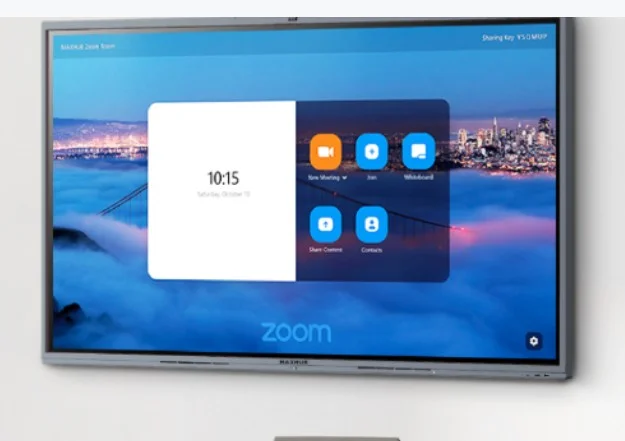
Teamwork has changed dramatically over the last few years. Today's employees work from offices, homes, client locations, and even while traveling. As a result, organizations need technology that keeps everyone connected without making collaboration complicated. Collaboration displays have emerged as one of the most practical solutions for modern workplaces because they combine interactive touch technology, wireless sharing, video conferencing, and cloud connectivity into a single platform.
The demand for better collaboration tools continues to rise as hybrid work becomes the standard rather than the exception. According to Microsoft's 2025 Work Trend Index, 82% of business leaders believe this is a pivotal year to rethink business strategy with AI and modern workplace technologies, while organizations are increasingly embracing human-AI collaboration. At the same time, industry research shows that collaboration display solutions is accelerating across corporate offices, education, and healthcare because businesses require more connected meeting spaces.
Instead of treating meeting rooms as isolated spaces, organizations are transforming them into collaborative environments where ideas flow naturally regardless of where participants are located.
The Evolution of Workplace Collaboration
Only a decade ago, meetings depended on projectors, printed documents, and physical whiteboards. While these tools served their purpose, they often slowed discussions. Participants struggled to share files, annotate presentations, or involve remote employees effectively.
Today's workforce expects instant access to information. Teams want to brainstorm on digital whiteboards, edit documents together, and join meetings with a single tap. Collaboration displays make this possible by bringing multiple communication tools together on one interactive screen. Rather than switching between separate devices, employees can present, write, share, and communicate without interruptions.
This shift is especially important because workplace collaboration remains a major productivity factor. Research highlighted by Zoom notes that communication issues still waste valuable employee time, while organizations increasingly depend on collaborative technologies to improve teamwork.
What Are Collaboration Displays?
A collaboration display is an interactive commercial display designed specifically for teamwork. Unlike a standard digital display that simply presents content, collaboration displays encourage participation from everyone in the room and those joining remotely.
These displays combine several advanced technologies into a single solution. Most models include a multi-touch screen that allows users to write, draw, annotate, and interact with content in real time. Built-in speakers, microphones, and cameras support high-quality video conferencing, making communication smoother for both in-person and remote participants. Wireless screen sharing enables users to present content directly from laptops, tablets, or smartphones without relying on cables. In addition, cloud integration provides quick access to shared documents and collaborative workspaces, allowing teams to edit, save, and share files instantly. Digital whiteboarding features further enhance brainstorming sessions by enabling multiple participants to contribute ideas simultaneously.
Unlike traditional commercial displays that primarily show content, collaboration displays are designed to create interactive experiences. They encourage active participation, simplify teamwork, and help meetings become more productive by bringing communication, content sharing, and collaboration together in one integrated platform.
Unlike traditional displays, collaboration displays allow multiple users to interact simultaneously. This makes discussions more engaging while reducing the delays caused by changing devices or reconnecting laptops.
Why Businesses Are Investing in Collaboration Displays
Organizations no longer measure meeting success by attendance alone. Instead, they evaluate productivity, engagement, and decision-making speed. Collaboration displays directly support these goals.
Hybrid work has become a permanent business model across many industries. Employees expect the same experience whether they are working remotely or sitting inside a conference room. Interactive collaboration displays bridge this gap by providing equal visibility and participation opportunities for everyone.
Businesses also benefit from simplified workflows. Teams can access cloud documents, edit presentations live, and instantly share meeting notes. This reduces administrative work and shortens project timelines.
Recent workplace studies show leaders increasingly believe AI-enabled collaboration improves teamwork, while employees spend a significant portion of their workday collaborating with colleagues.
Essential Features of Modern Collaboration Displays
The newest collaboration displays go far beyond large touchscreens. They integrate intelligent technologies that simplify communication while improving meeting efficiency.
- Interactive Touch Technology
Multi-touch capability allows several participants to write or edit simultaneously. Brainstorming sessions become more dynamic because everyone can contribute ideas directly on the display.
- Wireless Screen Sharing
Employees can present content from laptops, tablets, or smartphones without connecting cables. This saves valuable meeting time and encourages smoother transitions between presenters.
- AI-Powered Meeting Features
Artificial intelligence has become a valuable addition to collaboration technology. Modern displays often support automatic meeting summaries, live captions, speaker tracking, transcription, and language translation through integrated conferencing platforms. These features help participants stay focused instead of taking notes manually.
- Cloud-Based Collaboration
Cloud integration enables users to open, edit, and save documents directly from platforms such as Microsoft 365, Google Workspace, and other enterprise productivity suites. Everyone always works on the latest version without transferring files manually.
Industry Applications
- Corporate Offices
Conference rooms have become collaboration hubs instead of presentation spaces. Teams conduct strategy meetings, product reviews, design sessions, and client presentations using interactive displays. Employees can annotate documents, compare reports, and brainstorm in real time while remote participants contribute equally.
- Education
Schools and universities increasingly rely on collaboration displays to support interactive learning. Teachers can display multimedia content, conduct quizzes, and encourage group participation. Students benefit from more engaging lessons and easier collaboration during projects.
- Healthcare
Hospitals use collaboration displays for multidisciplinary consultations, training sessions, and patient education. Medical teams can review diagnostic images, discuss treatment plans, and connect with specialists remotely while maintaining clear communication.
Choosing the Right Collaboration Display
Selecting the right display requires evaluating both current and future business needs. Organizations should consider screen size, room capacity, software compatibility, operating hours, and collaboration platforms already in use.
Brightness also matters. Rooms with natural sunlight require higher brightness levels for better visibility. Resolution should match the intended applications, especially if detailed graphics or medical imaging will be displayed.
IT departments should also prioritize security, centralized device management, firmware updates, and compatibility with existing enterprise infrastructure. Choosing a scalable solution helps businesses adapt as technology evolves.
Future Trends in Collaboration Technology
The future of teamwork extends beyond video conferencing. AI will increasingly automate repetitive meeting tasks, allowing employees to focus on decision-making rather than administration. Microsoft's latest workplace research highlights growing adoption of AI-powered agents working alongside employees to improve productivity and collaboration.
Another important trend is platform flexibility. Modern meeting rooms are evolving toward device-agnostic environments where employees can seamlessly connect using Microsoft Teams, Zoom, Google Meet, or their preferred collaboration platform without changing room hardware.
Collaboration displays will also become smarter through advanced cameras, voice recognition, occupancy analytics, and predictive device management. These innovations will make meetings more inclusive while reducing IT maintenance.
Conclusion
Modern teamwork depends on technology that removes barriers instead of creating them. Collaboration displays combine interactive touch capabilities, wireless sharing, cloud connectivity, AI-assisted meetings, and high-quality communication into one unified solution. As hybrid work continues to reshape organizations, businesses need meeting spaces that support seamless collaboration regardless of employee location.
Investing in the right collaboration display is no longer just about improving presentations. It is about creating connected workplaces where ideas move faster, decisions happen sooner, and every participant can contribute equally. Organizations that embrace these technologies today will be better prepared for the evolving future of work.
Frequently Asked Questions
- 1. What is a collaboration display?
A collaboration display is an interactive touchscreen designed for meetings, brainstorming, video conferencing, and real-time teamwork.
- 2. How is a collaboration display different from a commercial display?
Commercial displays primarily present information, while collaboration displays allow users to interact, annotate, share content, and collaborate simultaneously.
- 3. Are collaboration displays suitable for hybrid workplaces?
Yes. They are specifically designed to connect in-office and remote employees through integrated collaboration and conferencing features.
- 4. What industries benefit the most from collaboration displays?
Corporate offices, education, healthcare, government, manufacturing, and training centers all benefit from improved communication and collaboration.
- 5. What should businesses consider before purchasing a collaboration display?
Key considerations include display size, touch capability, resolution, brightness, software compatibility, wireless connectivity, cloud integration, security, and long-term scalability.