Sign up with Google
 Sign in with Zoho

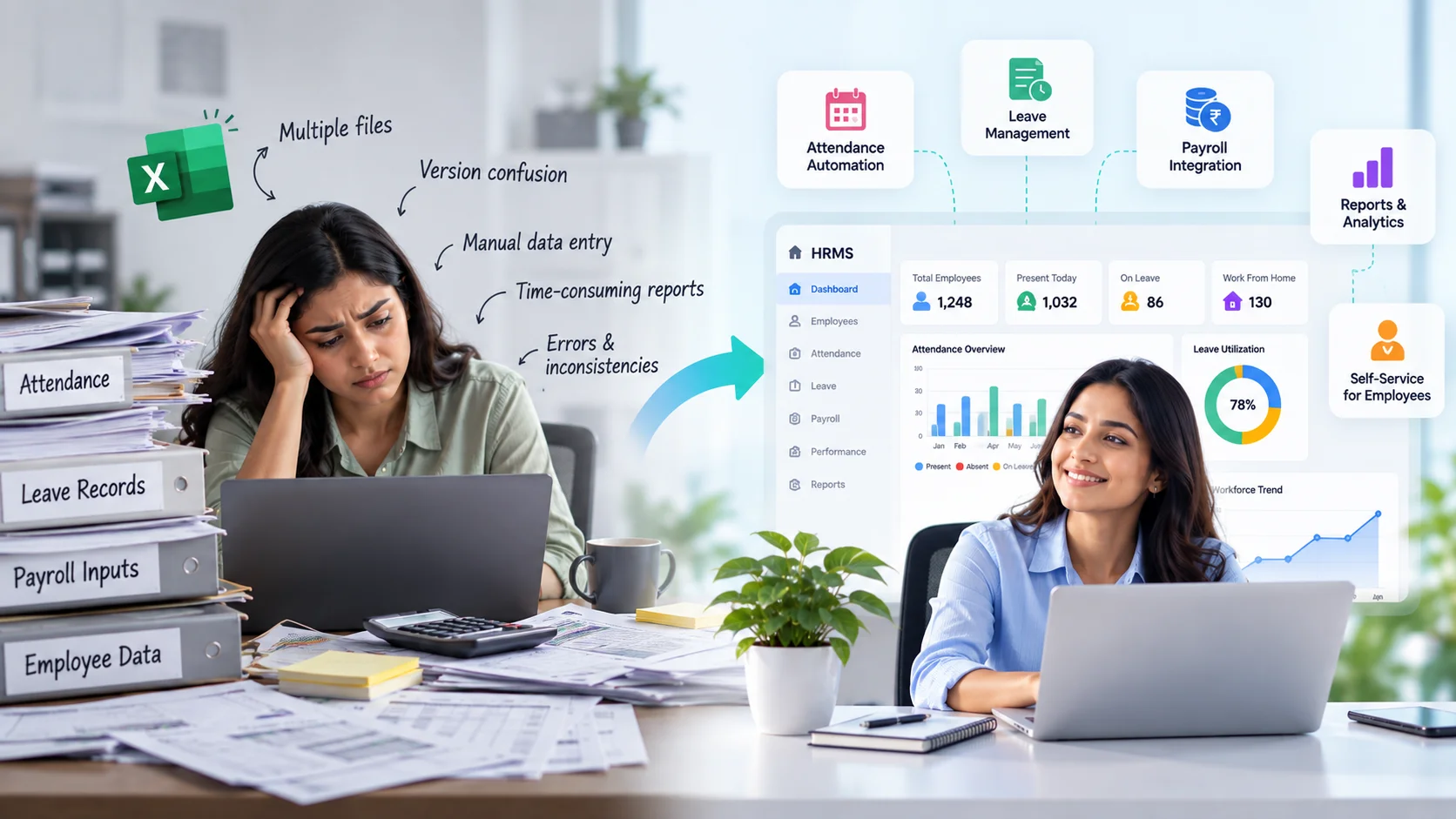
For many growing businesses, Microsoft Excel is one of the first tools used to manage employee information. It is familiar, flexible and readily available. A spreadsheet may work perfectly well when a company has 10 or 20 employees. But as the workforce grows, the same spreadsheet can gradually turn into multiple files for attendance, leave, payroll inputs, employee records and other HR activities.
This is why businesses evaluating the best HRMS software in India should consider more than simply replacing spreadsheets with another database. A modern Human Resource Management System (HRMS) can connect employee information with attendance, leave, payroll, approvals and other HR processes, reducing repetitive work while providing better visibility into workforce operations.
Excel remains a useful business tool. The problem begins when spreadsheets are expected to function as a complete HR management system.
Why Do Companies Start Managing HR with Excel?
There is a good reason Excel remains common in HR departments.
It is accessible, most professionals already know how to use it, and companies can quickly create their own formats without implementing specialised software.
An HR team can create separate sheets for:
- Employee master data
- Attendance
- Leave balances
- Salary information
- Payroll inputs
- Recruitment tracking
- Performance information
- Employee documents
For a small organisation, this approach can be manageable.
The challenge is that HR administration does not remain simple as the organisation grows. More employees mean more records, transactions, approvals and changes.
Eventually, spreadsheets designed for a smaller workforce may struggle to support the complexity of a growing organisation.
1. Employee Data Becomes Difficult to Manage
An employee record is not static.
Employees join, change departments, receive promotions, get new managers, update bank information, change addresses and eventually leave the organisation.
If this information is maintained across several spreadsheets, every change may need to be updated in multiple places.
Consider a simple department transfer.
The employee's department may appear in the employee master, attendance report, payroll file, organisational chart and performance records. If one spreadsheet is not updated, different departments can end up working with different information.
A centralised HRMS reduces this fragmentation by maintaining employee information within a connected system.
Instead of asking, "Which Excel file has the latest data?" authorised users can access the relevant information from a common source.
2. Version Control Becomes a Serious Problem
Anyone who has worked extensively with spreadsheets will recognise filenames such as:
Employee_Master_Final.xlsx
Employee_Master_Final_v2.xlsx
Employee_Master_Final_Updated.xlsx
Employee_Master_Final_Latest.xlsx
The problem is not Excel itself. It is the way files are shared, copied and edited across teams.
If HR sends an employee master to payroll and then makes changes to the original file, payroll may continue working with an older version.
Email attachments make this even more difficult because multiple copies of the same file can exist across different inboxes and computers.
An HRMS provides a central system where authorised users can work with current information instead of exchanging multiple versions of the same spreadsheet.
3. Manual Data Entry Increases the Possibility of Errors
Spreadsheets depend heavily on manual input.
A misplaced decimal, incorrect employee code, accidentally deleted formula or copy-paste error can affect calculations.
The risk becomes more significant when spreadsheet information is used for payroll.
For example, attendance may be maintained in one file, leave in another and monthly payroll inputs in a third. HR or payroll teams may need to consolidate these files before salaries are processed.
Every manual transfer creates another opportunity for an error.
An integrated HRMS can reduce repeated data entry by allowing relevant information to flow between connected processes.
Approved attendance and leave information, for example, can be considered during payroll processing according to configured company policies.
Human verification remains important, but teams spend less time repeatedly entering the same information.
4. Attendance Management Becomes Increasingly Complex
Managing attendance for 20 employees in a spreadsheet is very different from managing attendance for hundreds or thousands of employees.
Growing companies may need to account for:
- Multiple shifts
- Weekly offs
- Late arrivals
- Early departures
- Overtime
- Missed punches
- Work-from-home arrangements
- Attendance regularisation
- Multiple locations
Trying to calculate all of these conditions through spreadsheet formulas can quickly become complicated.
An HRMS with attendance management capabilities can apply configured attendance policies and highlight exceptions.
Instead of manually reviewing every attendance record, HR teams can focus on employees or transactions requiring attention.
5. Leave Management Requires More Than a Balance Column
At first, leave management may seem easy enough to maintain in Excel.
Create columns for opening balance, leaves taken and closing balance.
But real-world leave policies are often more complex.
Different employee categories may have different leave entitlements. Organisations may need to manage accruals, carry-forwards, lapses, half-day leave, sandwich policies and other rules.
There is also an approval process.
If employees request leave over email or messaging applications, HR may need to manually check approval status and update balances.
An HRMS can provide a structured leave workflow where employees apply through self-service, managers approve requests and balances are updated according to configured policies.
This creates better visibility for everyone involved.
6. Payroll Becomes Riskier as the Workforce Grows
Payroll is an area where spreadsheet errors can have immediate consequences.
Salary calculations may depend on basic pay, allowances, deductions, attendance, loss of pay, overtime, incentives and statutory requirements.
As the number of employees grows, payroll spreadsheets become increasingly complex.
Large spreadsheets may contain numerous formulas and links between sheets. A formula accidentally overwritten in one row can potentially create an incorrect salary calculation.
Modern payroll systems automate many rule-based calculations while maintaining structured employee and payroll information.
Automation does not remove the need for payroll review. It gives payroll teams a more controlled environment in which to perform that review.
7. Employee Self-Service Is Difficult with Spreadsheets
Spreadsheet-based HR management generally places HR at the centre of every transaction.
Employees may need to contact HR to:
- Check leave balances
- Request payslips
- Correct attendance
- Update personal information
- Check approval status
- Access HR documents
Each individual request may be small, but together they can consume significant HR time.
Employee Self-Service changes this model.
With an HRMS, employees can access permitted information and complete routine HR activities themselves.
Managers can similarly access relevant information about their teams and act on pending requests.
This reduces dependency on HR for routine administrative activities.
8. Reporting Takes More Time Than It Should
Management frequently asks HR questions such as:
How many employees are currently working in each department?
What is the absenteeism trend?
How much overtime was recorded this month?
How has headcount changed?
What is the monthly payroll cost?
When information is spread across multiple spreadsheets, answering these questions can require considerable manual effort.
HR may need to collect files, clean the data, create formulas, prepare pivot tables and verify whether the numbers are current.
An HRMS can provide standard reports and dashboards based on information already available in the system.
This allows HR teams to spend less time preparing data and more time understanding what the data means.
9. Spreadsheet-Based Approvals Are Difficult to Track
Many HR processes require approval from one or more people.
Consider a leave request that requires approval from a reporting manager and department head.
If the process happens through email or messaging platforms, HR may have limited visibility into where the request is currently pending.
The same challenge can occur with attendance corrections, expenses and other employee requests.
HRMS workflow automation can route requests according to configured approval hierarchies.
Employees can see request status, managers can see pending actions, and HR can monitor the overall workflow.
This creates accountability without requiring HR to manually follow up on every request.
10. Access Control Becomes More Important as Companies Grow
HR information can contain confidential employee data, including compensation and personal information.
Spreadsheet files may be shared through email, messaging applications, shared folders or individual computers.
As more people require access, controlling who can see what becomes increasingly important.
Modern HRMS platforms can provide role-based access controls.
For example, employees may access their own information, managers may access relevant information about their teams, and payroll professionals may have access to payroll-specific data.
The exact permissions depend on the organisation's requirements.
The objective is to provide necessary access without making sensitive workforce information unnecessarily available.
11. HR Needs Better Visibility as the Business Scales
One of the biggest limitations of spreadsheet-based HR management is not data storage. It is visibility.
An organisation may have all the required data somewhere in its spreadsheets but still struggle to answer basic workforce questions quickly.
Modern HRMS platforms can bring different HR processes together and provide dashboards and reports that make workforce information easier to understand.
HR teams can monitor attendance, leave, payroll and other workforce indicators from a more connected environment.
As organisations grow, this visibility becomes increasingly valuable for workforce planning and management decisions.
12. AI Is Further Changing How HR Teams Access Information
HR technology is now moving beyond traditional dashboards and reports.
AI-enabled HRMS platforms can make workforce information more accessible through natural-language interactions.
Instead of manually navigating through reports and applying multiple filters, HR professionals may be able to ask the system questions about attendance, payroll or workforce trends.
For example, a user might request a summary of attendance exceptions for a department or ask for payroll costs over a specific period.
AI can potentially retrieve, summarise and present relevant information more quickly.
However, organisations should still maintain appropriate human oversight, access controls and data-protection practices, particularly when AI systems interact with sensitive employee information.
When Should a Company Consider Moving Beyond Excel?
There is no specific employee count at which every organisation must implement an HRMS.
A better approach is to look for operational warning signs.
It may be time to reconsider spreadsheet-based HR management when HR teams are maintaining several versions of the same employee data, repeatedly entering the same information, spending excessive time preparing reports or manually tracking approvals.
Frequent payroll corrections, difficulty tracking attendance, increasing employee queries and limited visibility across locations can also indicate that existing processes are becoming difficult to scale.
The decision should therefore be based on complexity rather than headcount alone.
Excel Still Has a Place in HR
Moving to an HRMS does not mean HR professionals need to stop using Excel.
Spreadsheets remain extremely useful for ad-hoc analysis, modelling, temporary calculations and specialised reporting.
The difference is in their role.
Excel works well as a tool.
It becomes problematic when it is expected to function as the organisation's primary employee database, attendance system, leave management platform, approval engine and payroll system simultaneously.
A modern HR technology strategy can use an HRMS as the central system while allowing spreadsheets to support specific analysis when required.
Conclusion
Excel often plays an important role during the early stages of a company's growth. It is flexible, familiar and capable of handling basic HR information effectively.
But HR requirements change as businesses scale.
More employees bring more attendance records, leave transactions, payroll calculations, approvals, employee queries and reporting requirements. Processes that once required only a few spreadsheet updates can eventually become major administrative activities.
Modern HRMS platforms can centralise employee information, automate repetitive processes, connect attendance and payroll, enable employee self-service and provide better workforce visibility.
The goal is not simply to eliminate spreadsheets.
It is to ensure that HR technology grows along with the organisation.
When HR teams spend less time maintaining files, consolidating data and searching for the latest spreadsheet, they gain more time to focus on employees, workforce planning and the strategic priorities that support business growth.