Sign up with Google
 Sign in with Zoho

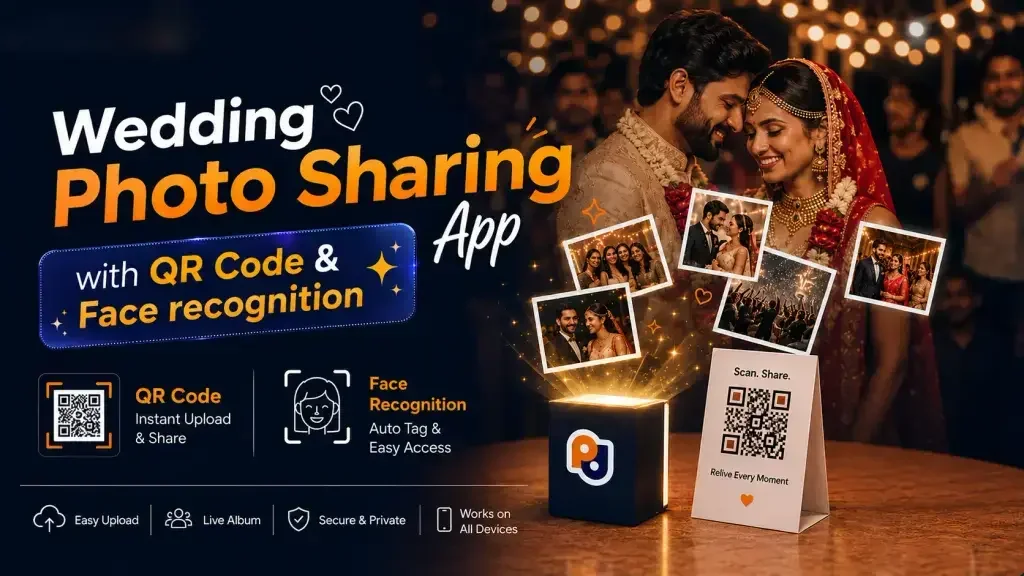
Wedding photos are increasingly being shared through online storage, digital galleries, and QR codes. Couples can provide guests with access to hundreds or even thousands of photographs without attaching a single file.
The two predominant methods are implementing a wedding QR code for photos that link directly to a gallery or using a digital space like Google Drive to house images and then sharing the link or QR code to that location
Both can function, but the options serve slightly different purposes. Google Drive is a cloud-storage and file-sharing application while a wedding-centric gallery system is more about discovery and exploration of event photographs. Understanding what a couple needs from their wedding photography service and the likely reaction of their guests will help narrow the possibilities.
Wedding Photo QR Code Description
A wedding photo QR code is QR code that links to an online gallery or photo sharing page
The QR code itself does not hold the images, but instead serves as a convenient method for guests to access the location where the photographs are being hosted.
For example, a couple can print a code and message on a poster at their reception that says something like
Scan to view your wedding photos
Guests can then use their smartphone camera to view the images without having to type out a web address.
Depending on the particular service, the linked page can feature galleries, searching and filtering options, download permissions, and other tools focused on making sharing and finding specific photographs easier
How Does Google Drive Work?
Google Drive is a cloud-storage service that lets users store files and share them with others
Google Drive sharing covers a broad range of options from view-only permissions to editing. In general, the application lets owners of files and folders share them with selected individuals or post a link elsewhere for people to access.
In the case of wedding photography, the service can be used to share a Google Drive folder with the couple and guests. Using the example from the previous section, a photographer could use the application to create a folder titled
Sarah & Rahul Wedding
Inside that folder, they could have additional folders for each part of the event
Haldi
Mehendi
Sangeet
Wedding Ceremony
Reception
Family Photos
Couple Portraits
The photographer can share the relevant subfolder or the entire folder with the couple and guests, depending on their preferences
In this case, the convenience of using Google Drive is difficult to ignore, but it largely depends on the couple’s expectations and the overall context of the event.
QR Code Sharing vs. Google Drive: What Is The Difference?
In many ways, the difference between QR code sharing and Google Drive boils down to the guest experience.
Google Drive is first and foremost a file storage space. With that in mind, a QR code pointing to a Google Drive folder may not be as convenient as a dedicated photo gallery. For one, the couple or photographer needs to make sure that the correct folder is shared and that the recipients have the right permissions. Beyond that, Google Drive only provides basic tools for managing, viewing, and discovering images.
A dedicated photo gallery, on the other hand, is built specifically with sharing and discovery in mind. This becomes especially useful if there are a large number of images and/or guests. If there are 10,000 wedding photographs and 200 guests, providing each with a downloadable album, searchable database, or filters for finding images would be far more practical than a simple folder.
QR Code Accessibility For Wedding Guests
QR codes are a convenient way to share information with wedding guests
They can be scanned with a smartphone camera or a QR code reading application. In many ways, QR code sharing is as simple as it sounds. A couple can stick a code on a wall or a table and tell people to scan it to view photographs. This would be more convenient than providing written instructions or a link.
The couple can attach a code to
the entrance
reception desk
dining tables
photo booth
wedding programs
thank-you cards
In theory, the same convenience can be achieved with a QR code generated from a Google Drive folder. With that said, the QR code itself is not exclusive to Google Drive. Rather than viewing it as QR code sharing vs Google Drive, it may be more useful to consider the difference between a QR-linked gallery and a QR-linked folder.
Organization Options For Multiples Events
A wedding can often involve multiple events
Haldi, Mehendi, Sangeet, the ceremony itself, the reception, and other activities can be part of a single wedding. Each of these events can generate a collection of images that need to be somehow organized. A photographer can organize Google Drive photos into folders, which is a simple enough solution.
Google Drive’s folder system will allow people to browse the images, although some people will likely have issues finding the ones they are looking for. This is due to the fact that finding a specific photograph within a folder requires opening the folder and searching through the thumbnails.
A similar issue would not necessarily appear in a dedicated photo gallery, because it can provide more discovery-oriented tools. This is not always the case, so each platform should be evaluated on its own.
Facial Recognition Search For Wedding Photographs
This is one area where a dedicated photo gallery can vastly outperform a simple cloud storage solution
Depending on the platform, the former can allow guests to search for photos using facial recognition. In theory, this means that a guest can take a picture of themselves and find all the photographs where they appear. This is especially useful if there are 10,000 images, but the guest appears in only 20-30 photographs.
Google Drive does not offer this feature, because it is designed with file management in mind rather than photo discovery. This is not a fault of the product, because it performs its advertised task exceptionally well. However, this feature can be an important consideration for some couples, depending on their requirements. A platform like Google Drive can be appropriate for couples that only want to distribute their wedding photos. For those that want something more, a different solution may be necessary.
Wedding Photographs: Considerations For Privacy
When considering online sharing of wedding photographs, privacy is always an important concern
Both services allow for some level of privacy, but Google Drive provides more granular permissions options.
With regards to Google Drive sharing, the application has a permission system that determines who can view or edit a file or folder. For the purposes of wedding photography, this would mean that the photographer and possibly the couple can view all files, but other guests can only see a preview or have download permissions.
Google Drive also offers limited access sharing. Essentially, this means that a folder can only be accessed by people who know the link or who have been given permission to access that folder specifically.
As for QR code access, a QR code should not be considered a robust security measure. In fact, the security of either method will depend on how the couple chooses to implement it. If the code merely leads to a gallery or folder that anyone can browse, then only very basic protections are in place.
Around The Middle: What Should You Choose?
When evaluating the options a Wedding QR Code for Photos, couples should consider what they need the gallery for. If the sole purpose is to put the images somewhere secure and share a link or QR code with friends and family, then either method will work.
However, if the purpose is for guests to scan a QR code and browse the images, searching for specific wedding photographs, then a QR code + dedicated photo gallery may be the superior option.
Google Drive vs QR-Based Wedding Gallery Comparison
When considering QR code vs Google drive for wedding photography, it is useful to compare the two options.
Google Drive Dedicated QR-Based Gallery
Cloud file storage Yes Usually
Folder organization Yes Usually (folder structure depends on the application)
Link sharing Yes Yes
QR-code access Yes (QR code leads to a link) Usually
Wedding-specific gallery No Usually
AI face search No Usually (depends on the application)
Guest discovery & discovery tools Only basic file/folder browsing Usually more specialized
Download management Yes Usually depends on the application
Event-specific presentation Folder-based Usually depends on the application
Privacy controls Yes Usually depends on the application
Photographer workflow Usually file-oriented Usually photo-delivery oriented
As can be seen, the two are not directly comparable in most cases.
An Example Scenario
Imagine a couple with 500 guests that wants their wedding photographs to be discovered and viewed by everyone. The photographer takes pictures at Mehendi, Sangeet, the wedding ceremony, and the reception. They have more than 10,000 wedding photographs in total.
Using Google Drive, the photographer can share the folder with the couple and guests. They can either browse the images or download the albums. Each person will have to navigate the folders to find the images they want.
Using a dedicated gallery, the photographer can share a QR code for wedding pictures at the entrance to the venue. People can scan the code and browse the event gallery to find the images they want. They can also use search tools provided by the application.
In either case, the family members will probably have no issues, because the images are stored in a downloadable album.
However, if someone wants to find the pictures of themselves at the reception, a dedicated gallery can make it much easier.
When Does Google Drive Make Sense?
Google Drive makes sense in the following situations
1. If the couple already uses the application on a regular basis
2. If the couple only wants to store the images and provide access to guests
3. If the wedding does not have a complex set of events
4. If guests are okay with browsing files and folders to find what they are looking for
5. If the couple wants a granular permissions system
6. If the couple wants a basic set of tools for managing and distributing images
7. As a part of a photographer’s delivery workflow (although this is a separate consideration)
When Would a QR Photo Gallery Make More Sense?
A QR photo gallery would make more sense in these situations
1. If guests are supposed to access the gallery with a QR code
2. If the wedding has multiple events
3. If the couple wants a more presentation-focused delivery method
4. If the guests are likely to want to search for specific photographs
5. If facial recognition search is important
6. If the photographer wants a more streamlined delivery method for the images
7. If the couple wants to provide more specialized tools for guests
As with always the case, the exact features will depend on the provider and the application being used
What Should You Consider Before Deciding Between QR Code Or Google Drive?
Before selecting one method of gallery building, there are several factors that a couple should consider
1. Test the experience for someone unfamiliar with the gallery
2. Ensure that everything is mobile-friendly
3. Double-check permission and download settings
4. Organize the images so that guests do not have to look through a giant album
5. Store a backup of the photographs somewhere else, because a guest-facing gallery is not an appropriate storage method for such valuable images
6. Provide clear instructions to guests
Verdict: Which Should You Choose?
As mentioned previously, there is no single solution that will work for all weddings. There are several factors couples must consider.
Google Drive is focused on file management, which makes it appropriate for simple tasks, such as providing a shared space to store wedding photographs. The company offers granular permissions and organizing tools that can be useful for some circumstances.
A dedicated Wedding QR Code for Photos is more about the guest experience. As such, it can provide an intuitive experience that helps guests discover and find photographs. Facial recognition search tools and QR code accessibility are also important, in cases where these features are needed.
In the end, everything will come down to the size of the wedding, the number of events, the expectations of the guests, the privacy requirements, and the overall delivery expectations of the photographer.