
 Sign up with Google
 Sign in with Zoho

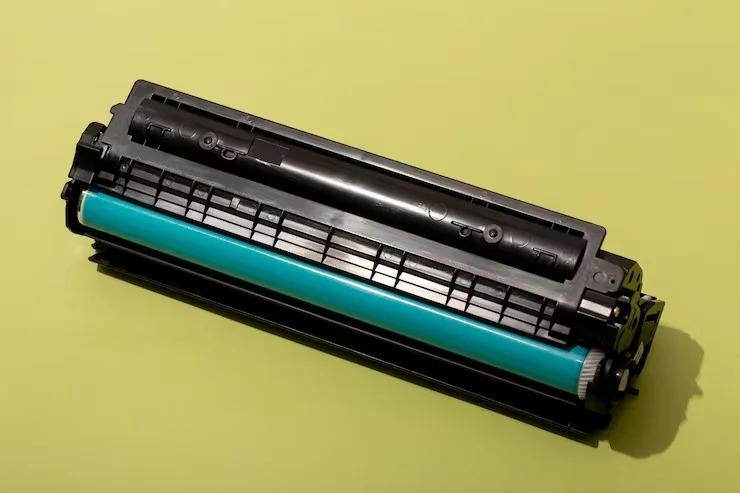
Seeing a “Replace Toner” message on your HP printer can be confusing, especially when the cartridge still appears to have toner inside. For businesses and home users in the USA, this is a common printer issue that doesn't always mean the cartridge is completely empty.
HP printers use toner-level estimates, cartridge chips, page counts, and print-quality monitoring to determine when a cartridge should be replaced. As a result, the printer may display a replacement warning even when some toner remains.
Understanding why this happens can help you avoid replacing a cartridge too early and choose the right replacement when the time comes.
Why Does an HP Printer Say “Replace Toner” Early?
The most common reason is that the printer doesn't physically measure every grain of toner inside the cartridge. Instead, it uses information from the cartridge's chip and internal monitoring system to estimate toner usage.
Once the estimated toner level reaches a certain threshold, the printer may display a warning.
This means there can still be visible toner inside the cartridge even though the printer considers it near the end of its expected service life.
1. The Toner Cartridge Chip May Trigger the Warning
Many modern HP laserjet toner cartridges include a chip that communicates cartridge information to the printer.
The chip can track information such as estimated toner usage and cartridge status. If the chip reports that the cartridge has reached its expected limit, the printer may display a replacement message.
In some cases, the physical toner remaining inside the cartridge doesn't match the printer's estimated level.
2. Toner Can Remain in the Cartridge but Still Produce Poor Prints
Another reason for the warning is that the cartridge's usable printing life isn't determined only by how much loose toner remains.
The cartridge's drum, imaging components, or other internal parts can wear over time. This can affect print quality even when some toner is still present.
You may notice:
- Faded text
- Gray backgrounds
- Streaks
- Uneven printing
- Repeating marks
- Blank areas on pages
If print quality is already declining, replacing the cartridge may be more practical than continuing to use it.
3. Toner-Level Estimates Aren't Always Exact
An HP toner cartridge is designed around an estimated page yield. Actual results depend on what you're printing.
For example, documents with large graphics, bold text, images, or heavy coverage use more toner than simple text documents.
Therefore, two users with the same cartridge model may reach the replacement warning at different times depending on their printing habits.
4. Restarting the Printer May Not Remove the Message
Some users try turning the printer off and back on when the replacement warning appears. While restarting can resolve temporary communication errors, it usually won't reset a cartridge that the printer has already identified as depleted or near the end of its expected life.
If the warning continues after restarting, check the cartridge installation and printer instructions before deciding what to replace.
HP Toner vs. HP Ink: Don't Confuse the Two
One common source of confusion is the difference between toner and ink.
Laser printers use toner powder, while inkjet printers use liquid ink. HP toner cartridges are designed for HP laser printers, while an hp ink cartridge is intended for compatible HP inkjet models.
Likewise, ink cartridges for hp printers aren't interchangeable with laser toner cartridges.
Before purchasing a replacement, always check the exact printer model and cartridge number.
What If Your HP Printer Uses a CE390 Cartridge?
Some HP LaserJet models use the CE390 cartridge series. If your printer requires this cartridge family, selecting the correct cartridge number is important.
For higher-capacity printing, a ce390x toner cartridge is commonly associated with the high-yield version of the CE390 series.
If you're looking for a compatible alternative, ce390x compatible options may provide another purchasing choice, provided the cartridge is specifically designed for your printer model.
The standard cartridge option is the ce390a toner, while a ce390a compatible toner can be considered when you want a compatible replacement rather than an original cartridge.
Always verify the printer model and cartridge compatibility before ordering.
Should You Replace the Toner Immediately?
Not necessarily.
If your printer shows a warning but your documents are still printing clearly, you may have some usable toner remaining. However, you should monitor print quality and keep a replacement cartridge available if the printer is used for important business documents.
If the printer displays a stronger message such as “Replace Toner” and stops printing, follow the manufacturer's instructions for replacing the cartridge.
Avoid repeatedly shaking or modifying a cartridge to extend its life, as this can create messy or inconsistent printing.
How to Choose the Right Replacement Cartridge
Whether you choose an original HP cartridge or a compatible alternative, check these details before purchasing:
Check the Exact Cartridge Number
Don't rely only on the printer brand. Match the cartridge number shown in your printer documentation or current cartridge.
Confirm Printer Compatibility
A cartridge that looks similar may not work with your specific HP LaserJet model.
Consider Page Yield
If you print frequently, a high-yield cartridge may offer better value over time.
Choose a Reliable Supplier
For compatible cartridges, supplier quality matters. Look for clear compatibility information, consistent product specifications, and a reasonable return or replacement policy.
When Is It Better to Replace the Cartridge?
Consider replacing the cartridge when:
- Print quality has noticeably deteriorated.
- The printer repeatedly displays a replacement warning.
- Pages contain streaks or faded areas.
- The cartridge has reached its expected page yield.
- The printer stops accepting the cartridge.
- You need consistent print quality for business or professional documents.
A replacement isn't always necessary at the first warning, but ignoring obvious print-quality problems can result in wasted paper and frustrating reprints.
Final Thoughts
An HP printer can say “Replace Toner” even when the cartridge isn't physically empty because toner levels are generally based on estimated usage and cartridge information rather than simply measuring the remaining powder.
Before replacing the cartridge, check the print quality, printer model, and exact cartridge number. If you use an HP LaserJet printer that takes CE390 cartridges, verify whether you need a ce390x toner cartridge, CE390X-compatible option, ce390a toner, or ce390a compatible toner.
Choosing the correct cartridge can help keep your HP printer producing consistent, reliable documents while avoiding unnecessary replacement costs.











.webp)