Sign up with Google
 Sign in with Zoho

Have you ever opened an old document and a newer version and thought, “What exactly did I change here?”
It happens more often than you might expect. A paragraph gets rewritten, a few sentences are removed, and perhaps one important line is added somewhere in the middle. When the document is only a few lines long, finding those changes is easy. With a long article, report, or code file, it becomes a completely different story.
That is where a text difference tool can be genuinely useful.
Why Comparing Text Manually Gets Difficult
I have found that the hardest part of comparing two documents is not understanding the content. It is remembering where the changes are.
Imagine you wrote a 1,500-word article last week and edited it again today. You know you changed the introduction and added some information near the end, but you cannot remember exactly what was removed. Reading both versions from beginning to end is possible, but it is not a very efficient way to spend your time.
A text comparison tool gives you a much quicker starting point. Instead of looking at everything, you can focus directly on the parts that are different.
A Practical Example
Suppose an original product description says:
“Designed for everyday use, this backpack has three storage compartments and a lightweight design.”
Later, the description is changed to:
“Designed for everyday travel, this backpack has three storage compartments, a laptop sleeve, and a lightweight design.”
There are several small changes in that sentence. “Use” became “travel,” a laptop sleeve was added, and the rest stayed the same.
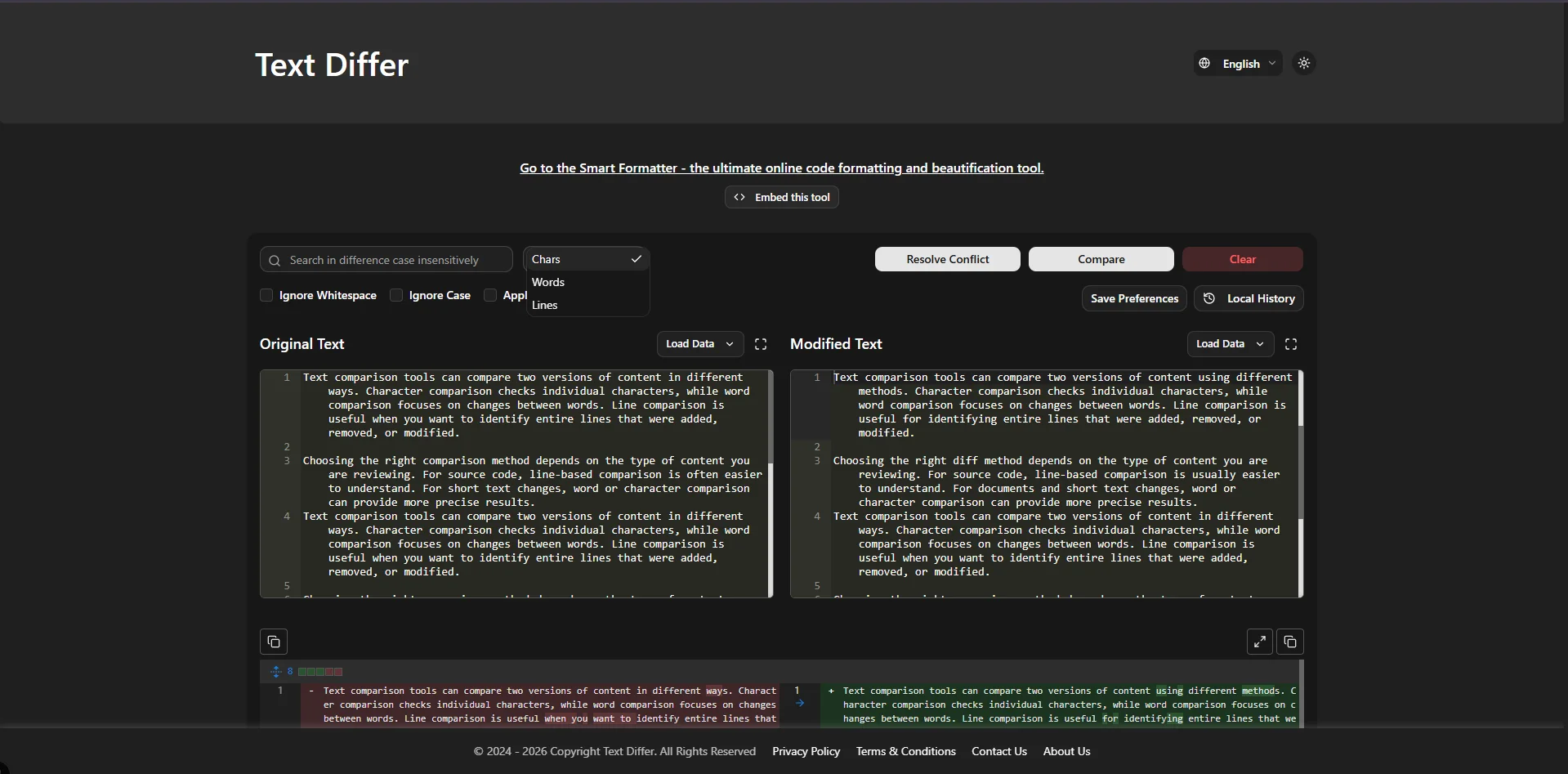
When you are comparing several paragraphs like this, spotting every change by simply switching between documents can become tedious. A text differ tool makes these changes much easier to review.
Useful for Writers and Content Editors
Writers often create multiple drafts before publishing an article. An editor might suggest changes, and the writer may make another round of revisions afterward.
Instead of keeping track of every edit mentally, you can compare the earlier and newer versions. This can help answer simple but important questions:
- Did I include the editor's suggested changes?
- Was an important sentence accidentally deleted?
- Which parts of the article were rewritten?
- Did I change the wording of a particular section?
- Is the final version actually different from the previous draft?
For content teams, this can also make reviewing revisions less frustrating.
It Is Not Just for Articles
Text comparison is equally useful outside content writing.
Developers can compare two versions of source code to see which lines were modified. Students can compare drafts of an assignment. People working with documentation can check whether an updated version contains the intended changes.
Even something as simple as comparing two lists can benefit from a difference checker. If the lists are long, manually finding one missing or newly added item is surprisingly easy to get wrong.
A Quick Browser-Based Option
For occasional comparisons, I prefer tools that do not require a complicated setup. If I only need to check two pieces of text, opening a browser tool and pasting the content is usually more convenient than installing dedicated software.
Text Differ is designed for this type of task. You can place two versions of text into the comparison interface and use the highlighted differences to see what has changed.
Make Revision Work Less Tedious
Text comparison will not replace careful editing. You still need to decide whether a change is actually an improvement and whether the final content makes sense.
What it does well is remove some of the repetitive work. Rather than spending time hunting for tiny differences, you can see the changed sections and spend your attention on reviewing them.
That is probably the biggest advantage of using a text comparison tool: it turns a tedious checking task into something much quicker.
Final Thoughts
Comparing two versions of text sounds like a small task until you have a long document sitting in front of you. At that point, manually searching for differences can take much longer than expected.
Whether you are editing blog posts, reviewing documents, checking code, or simply trying to remember what changed between two drafts, a text differ tool can make the process considerably easier.
For quick comparisons, keeping a browser-based text comparison tool handy can save time and help you review changes with much less effort.