Sign up with Google
 Sign in with Zoho

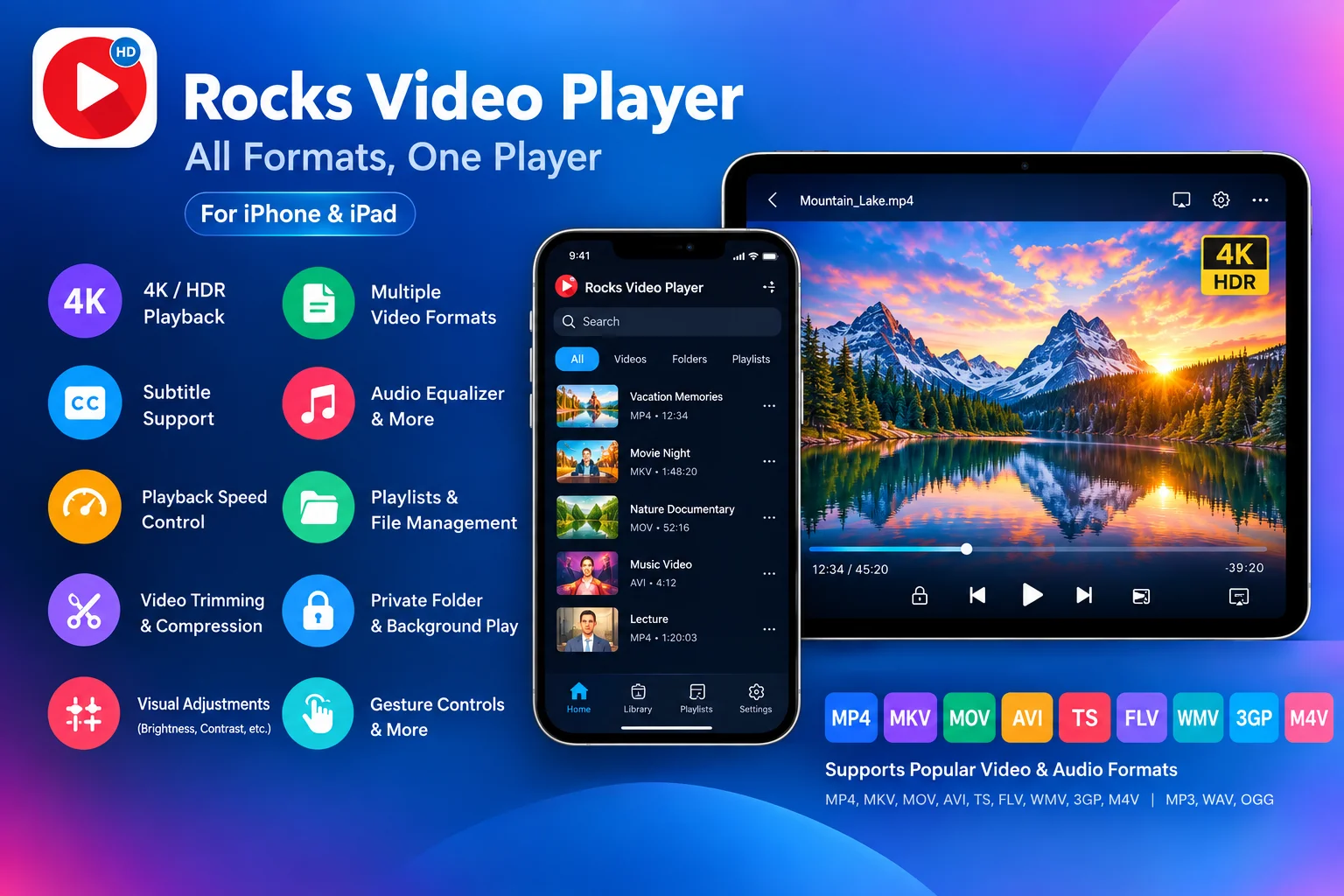
The iPhone and iPad have become much more intresting than communication and productivity devices. They are now capable of personal entertainment systems, allowing users to watch movies, educational videos, downloaded media, personal recordings, music videos, and other content wherever they are. As video quality and file formats continue to evolve, choosing the right video player can have a great impact on the overall viewing experience.
While the default video experience may be sufficient for some users, people with larger or more diverse media libraries often need greater flexibility. Support for different file formats, high-resolution playback, subtitles, audio controls, playback customization, and media organization can all become important when choosing a video player.
Users looking for a versatile solution can also explore the official Rocks Video Player website to learn more about its features and mobile video experience.
So, what should you actually look for when choosing a video player for iPhone and iPad?
1. Start With Video Format Compatibility
One of the most important factors is format support.
Video collections often contain files obtained from different sources, and those files may use different containers or codecs. If a player supports only a limited selection of formats, users may find themselves converting files before they can watch them.
A versatile mobile video player should therefore support a broad range of commonly used formats. Rocks Video Player, for example, supports formats including MP4, MKV, MOV, AVI, TS, FLV, WMV, 3GP, and M4V. It also supports audio formats such as MP3, WAV, and OGG.
For users who maintain a mixed media library, broad format compatibility can reduce the need to switch between different applications or convert files simply to make them playable.
2. Consider High-Resolution Playback
Video quality is another major consideration.
Modern iPhones and iPads are capable of displaying high-quality content, so users who have HD, Full HD, 4K, or HDR videos may want a player that can handle those formats effectively. A capable player should allow compatible high-resolution content to be enjoyed without unnecessarily restricting playback to standard-definition quality.
Rocks Video Player supports HD, Full HD, 4K, and HDR video playback, making high-resolution support one of its best features.
However, resolution alone should not determine your choice. The actual viewing experience also depends on the quality of the original video, the device display, audio setup, and the player's playback implementation.
3. Look for Useful Subtitle Controls
Subtitles are essential for many types of content. They can make foreign-language videos easier to follow, improve accessibility, and allow people to watch content in environments where audio cannot be played loudly.
A good video player should do more than simply display subtitles. Customization options can make subtitles easier to read on a relatively small mobile screen.
Rocks Video Player includes subtitle support with options to adjust subtitle size and color. These seemingly small controls can make a meaningful difference for users who regularly watch subtitled content.
When comparing players, consider whether the subtitle experience matches the way you normally consume videos.
4. Check Playback Customization
Different viewers have different preferences, and different types of content may require different playback settings.
For example, someone watching a lecture may want to increase playback speed, while someone watching a movie may prefer standard playback. Others may want to zoom into the screen, change the aspect ratio, rotate the display, or lock the screen while watching.
A flexible player can make these adjustments available without requiring another application.
Rocks Video Player provides playback speed options ranging from 0.5x to 2x, along with features such as pinch-to-zoom, fullscreen viewing, screen flip, screen lock, and gesture controls.
These controls are particularly useful for users who want more control over how videos appear and play on their device.
5. Don't Overlook Audio Features
Video quality gets most of the attention, but audio is equally important to the viewing experience.
Different types of media can benefit from different audio settings. A music video, movie, lecture, and recorded conversation may not all sound their best using identical settings.
An integrated equalizer can provide additional flexibility. Rocks Video Player includes equalizer presets such as Rock, Jazz, and Classical, along with bass boost and audio enhancement options. It also supports multiple audio tracks, which can be useful for videos containing different languages or audio sources.
Having these controls within the player can make the overall media experience more convenient.
6. Think About Media Organization
As a video collection grows, finding individual files can become surprisingly difficult.
A useful video player should ideally provide more than playback. Playlists, folders, and file-management features can help users keep their media organized and make frequently watched content easier to access.
Rocks Video Player provides playlists, folders, and file-management functionality. Its auto-play-next feature can also be useful when watching several videos consecutively.
For users who keep a substantial amount of video content on an iPhone or iPad, organization features can be just as valuable as playback quality.
7. Consider Additional Media Tools
Another factor worth considering is whether the application provides useful tools beyond basic playback.
For example, there may be times when you want to shorten a video or reduce its file size before sharing or storing it. Using a separate application for every small task can make media management unnecessarily complicated.
Rocks Video Player includes video trimming and compression tools, allowing users to handle some basic editing and file-size management tasks within the same application. It also provides a private folder for selected content and supports sharing through standard iOS sharing options.
These additions can make an all-in-one video application more practical for everyday use.
8. Look for Visual Adjustment Options
Not every video looks perfect under every viewing condition. Differences in source quality, lighting, and personal preference can affect how comfortable a video is to watch.
Some video players provide visual adjustment controls that allow viewers to customize the appearance during playback.
Rocks Video Player's Beautify feature includes controls for brightness, contrast, hue, saturation, and gamma. These adjustments allow users to modify the viewing experience according to their preferences without changing the original video file.
For people who regularly watch different types of content, this level of visual flexibility can be useful.
9. Consider How You Actually Watch Videos
The best video player is ultimately the one that fits your personal viewing habits.
Someone who mainly streams a limited selection of content may not need extensive file-management features. On the other hand, someone who keeps movies, downloaded videos, recordings, lectures, and music videos on an iPhone or iPad may benefit from a more comprehensive solution.
Features such as background playback, screen lock, adjustable playback speed, subtitle customization, playlists, and gesture controls can make mobile viewing more adaptable to different situations.
Instead of choosing a player based on one headline feature, it is worth considering the complete set of functions you are likely to use.
10. Why an All-in-One Approach Can Make Sense
Using separate applications for playback, audio adjustment, file organization, and basic video editing can become inconvenient over time.
An all-in-one video player takes a different approach by bringing several related functions together. High-resolution playback, broad format support, subtitles, audio customization, playlists, file management, visual adjustments, and basic editing tools can all contribute to a more complete mobile media experience.
This is the approach taken by Rocks Video Player, which combines playback and practical media-management features for iPhone and iPad users.
The benefit is not muchmore having the largest possible list of features. Instead, it is having useful capabilities available in one place when they are actually needed.
Making the Right Choice
Choosing a video player for iPhone or iPad should come down to your individual requirements rather than simply selecting the application with the longest feature list.
If you regularly work with different video formats, high-resolution files, subtitles, multiple audio tracks, or a large personal media library, features such as format compatibility, playback controls, audio customization, and organization tools deserve particular attention.
For users who want a broader set of capabilities in one application, Rocks Video Player offers a combination of high-resolution playback, multi-format support, subtitle customization, flexible playback controls, audio features, playlists, file management, visual adjustments, and basic video tools.
As mobile devices continue to become central to the way people consume digital media, the role of the video player is also changing. It is no longer simply a tool for pressing play. A well-designed player can give users greater control over how their content looks, sounds, plays, and is organized.
Ultimately, the right choice is the player that fits your media habits while making everyday video viewing simpler, more flexible, and more enjoyable.